<?xml version="1.0" encoding="UTF-8"?>
<feed xmlns="http://www.w3.org/2005/Atom">
    <title>Tom Saxton&apos;s Blog</title>
    <link rel="alternate" type="text/html" href="https://saxton.org/tom_saxton/" />
    <link rel="self" type="application/atom+xml" href="https://saxton.org/tom_saxton/atom.xml" />
    <id>tag:saxton.org,2019-08-26:/tom_saxton//2</id>
    <updated>2022-04-21T21:36:43Z</updated>
    
    <generator uri="http://www.sixapart.com/movabletype/">Movable Type 5.2.13</generator>

<entry>
    <title>Tesla Roadster Care</title>
    <link rel="alternate" type="text/html" href="https://saxton.org/tom_saxton/2022/04/tesla-roadster-care.html" />
    <id>tag:saxton.org,2022:/tom_saxton//2.60</id>

    <published>2022-04-21T19:56:07Z</published>
    <updated>2022-04-21T21:36:43Z</updated>

    <summary>For owners who may be new or unfamiliar with the Tesla Roadster, I&apos;ll run through the basic information needed to preserve this rare and special vehicle. The most obvious concern is properly maintaining the battery pack. If the Roadster is...</summary>
    <author>
        <name>Tom Saxton</name>
        
    </author>
    
    
    <content type="html" xml:lang="en-us" xml:base="https://saxton.org/tom_saxton/">
        <![CDATA[<p>For owners who may be new or unfamiliar with the Tesla Roadster, I'll run through the basic information needed to preserve this rare and special vehicle.</p>
<p>The most obvious concern is properly maintaining the battery pack. If the Roadster is left unattended and without power for weeks or months, the battery back will slowly discharge until the pack is fully depleted. If this happens, the battery pack may be ruined. Even if plugged in, if power is interrupted by a popped breaker, extended outage, service disconnection, etc., permanent damage to the battery pack can occur.</p>
<p>Also of concern is temperature. The Roadster should not be left unplugged in extreme temperatures. If the battery pack gets hot, it should be plugged in so it can cool. Consult the <a href="https://www.tesla.com/sites/default/files/blog_attachments/eng_jp_2.5owners_manual_-_web_version_-_ja_en_0.pdf">owners manual</a> for more information.</p>
<p style="text-align: center;"><strong>Charging</strong></p>
<p><strong>Level 1</strong> In the United States and Canada, the Roadster can be charged at 120V with a simple cord sold as the MC-120. It just connects the car to power with no EVSE logic and the car assumes a 15A circuit suitable for charging at 12A. At this power level, the car can't run the full cooling system and in fact uses a lot of the power just to run the coolant pump. This means a slow rate of charge, and in fact in hot weather, may use all of the power just trying to cool the battery pack. In comfortable weather, not too hot and not too cold, and no rush to get charged, this can be an effective way to charge. Some owners used Level 1 exclusively. Since the coolant pump tends to run continuously, even after charging is complete, there may be a corresponding reducing in the lifetime of the coolant pump.</p>
<p><strong>Level 2</strong> charging means connecting to 240V single-phase power using an EVSE that communicates the maximum current draw allowed for the circuit. It uses the same communication protocol as standard J-1772 charging stations. Having more power means the battery pack can be better thermally managed, which can make quite a bit of noise when the fans, compressor and pumps are all going full tilt. The maximum charge rate of the Roadster is 240V/70A. Unless we were in a hurry on a road trip, we generally charged at 240V/32A which yields good energy efficiency and may be nicer to the battery.</p>
<p>The Roadster can charge from a standard J-1772 station with an appropriate adapter. Tesla sold one for a while and there's an <a href="https://sites.google.com/site/thecantesla2j1772/home">aftermarket adapter</a>.</p>
<p style="text-align: center;"><strong>Charge Modes</strong></p>
<p>The Roadster has four charge modes, used for different purposes.</p>
<p><strong>Standard Mode</strong> limits charging to the middle 80% of the battery pack, not letting the charge level get too high and warning the driver, and even shutting the car down, before getting critically low. This is the mode used for daily charging of a Roadster that's driven locally with some regularity.</p>
<p><strong>Range Mode</strong> opens up the full charging range, allowing a higher state of charge and enables driving down to a lower start of charge. Range mode also limits power from the pack, and thus reducing maximum acceleration in the name of extending range. Occasional range mode charging didn't seem to have a negative effect on our battery pack, but charging frequently to the top of range mode may accelerate the loss of battery capacity. When we owned a Roadster, we'd do a full range mode charge at the start of long road trip, then switch over to standard mode for driving.</p>
<p><strong>Performance Mode</strong> uses the full charging range, allows the battery to get warmer while charging, and allows maximum power (full acceleration). This is appropriate for driving on a track, but probably accelerates loss of battery pack capacity if used often.</p>
<p><strong>Storage Mode</strong> displays the state of charge like Standard Mode, but will let the state of charge drop to around 30% then will maintain that level of charge. This is the best mode to use when the Roadster won't be driven for weeks or months. The car must be plugged in to maintain the health of the battery pack. The disadvantage of Storage Mode is that if the power supply is interrupted, it will start discharging from around 30%, so it will get into trouble sooner than if left in Standard mode. That's probably more of a concern if it's in long term storage and ignored vs. being kept for the winter in your garage where you'll notice of the power goes out or the breaker gets tripped.</p>
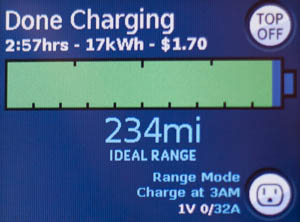
<p>An example charge screen:</p>
<p><img alt="roadster-charge-info.jpg" src="https://saxton.org/tom_saxton/images/roadster-charge-info.jpg" width="300" height="222" class="mt-image-center" style="text-align: center; display: block; margin: 0 auto 20px;" /></p>
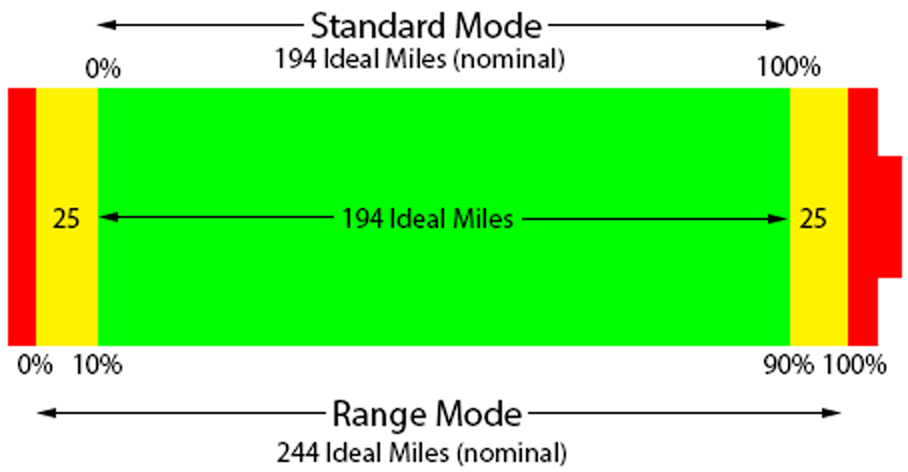
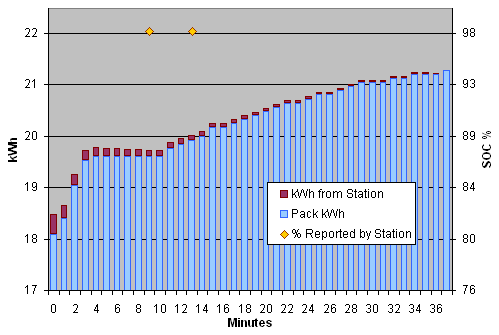
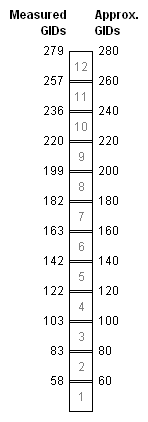
<p>The drawing below shows how to interpret the state of charge in the two main charge modes. Range values are for the original 53 kWh battery pack when new.</p>
<p><img alt="Charge-Modes.png" src="https://saxton.org/tom_saxton/images/Charge-Modes.png" width="454" height="236" class="mt-image-center" style="text-align: center; display: block; margin: 0 auto 20px;" /></p>
<p style="text-align: center;"><strong>Vehicle Log</strong></p>
<p>The Roaster maintains a detailed internal log which can be downloaded via the USB port in the console. Although the format of the logs isn't documented by Tesla, various owners have been able to decode and extra a great deal of data. The log file has two sections: a long term section that has basic info and a more detailed section of recent driving and charging. See the page on the <a href="https://idleloop.com/tesla/vmsparser/">VMSParser</a> I created for more information.</p>
<p style="text-align: center;"><strong>Remote Monitoring</strong></p>
<p>The Roadster did not have support for remote monitoring, not at all for the 2008 (v1.5) Roadster and nothing driver-accessbile for the 2009 and later (v2) Roadster.</p>
<p>There is an aftermarket system availble, the <a href="https://www.openvehicles.com/">Open Vehicle Monitoring System</a> or OVMS. OVMS allows for remote monitoring of charging, GPS tracking, custom charge settings, and viewing battery metrics. In addition to allowing manual remote monitoring, it can also send low-battery alerts and unexpected motion alerts if the car moves not under its own power.</p>
<p style="text-align: center;"><strong>More Resources</strong></p>
<p>There are a number of other entries on the blog detailing our adventures with the Roadster, plus another collection of longer <a href="https://idleloop.com/tesla/">Roadster articles</a> of practical and historical interest.</p>
<p>The <a href="https://teslamotorsclub.com/tmc/forums/roadster-2008-2012.62/">Tesla Motors Club forum</a> is the best community resource around, although its focus has natually shifted to the newer Tesla vehicles.</p>
<p></p>]]>
        
    </content>
</entry>

<entry>
    <title>Wordle Start Words</title>
    <link rel="alternate" type="text/html" href="https://saxton.org/tom_saxton/2022/01/wordle-start-words.html" />
    <id>tag:saxton.org,2022:/tom_saxton//2.59</id>

    <published>2022-01-25T22:56:14Z</published>
    <updated>2022-01-26T02:10:28Z</updated>

    <summary>Having played a similar game years ago, as soon as I learned about Wordle, I wanted to figure out a set of words to use as starting guesses. My thought is to: Maximize the number of unique letters guessed. Prioritize...</summary>
    <author>
        <name>Tom Saxton</name>
        
    </author>
    
    
    <content type="html" xml:lang="en-us" xml:base="https://saxton.org/tom_saxton/">
        <![CDATA[<p>Having played a similar game years ago, as soon as I learned about <a href="https://www.powerlanguage.co.uk/wordle/" target="_blank">Wordle</a>, I wanted to figure out a set of words to use as starting guesses. My thought is to:</p>
<ol>
<li>Maximize the number of unique letters guessed.</li>
<li>Prioritize the more frequently used letters.</li>
</ol>
<p>The first means I want to pick words that don't repeat letters, that's pretty simple. The second requires first getting data on letter frequency. There's a <a href="https://en.wikipedia.org/wiki/Letter_frequency" target="_blank">wikipedia article on letter frequency</a> that has two frequency tables, one for letter use in English text and another for letter use in dictionary words.</p>
<p>ETAOI NSHRD LCUMW FGYPB VKXJQ Z - text frequency<br />ESIAR NTOLC DUGPM KHBYF VWZXQ J - dictionary frequency</p>
<p>The text frequency list is skewed by common words, so the dictionary word frequency seems more appropriate for this application. Even better would be to only consider 5-letter words. I have an electronic version of the <a href="https://scrabble.merriam.com/" target="_blank">Official Scrabble Players Dictionary</a>, so I filtered that to find 8,183 five-letter words and used that to compute letter frequency.</p>
<p>SEARO ILTND UCPYM HGBKF WVZXJ Q - OSPD 5-letter word frequency</p>
<p>The obvious way to start is with a word that hits all five of the most frequently used letters, AROSE for example. That's great for a first guess, but even with that word, it's not common for the first word to give enough information to start guessing the answer, and it's going to be quite constrained to pick follow-up words that don't repeat characters.</p>
<p>This calls for a program to create a list of three to four words that achives the goals stated above. Considering all possible choices for 4 words out of 8,183 would take a lot of computing time and would mostly be churning through terrible word combinations. To reduce the number of combinations to look at, I further filtered the list to words that don't repeat letters, which dropped the count down to 5,404 words. From that list, I pulled out four groups of words. Group 1 is words that have at least three letters in the top 5 (SEARO), group 2 has at least three letters in the next five letters (ILTND), and so forth.</p>
<p>Group 1: 197 words<br />Group 2: 448 words<br />Group 3: 155 words<br />Group 4: 8 words</p>
<p>Not surprisingly, group 5 is empty: there are no words that have 5 distinct letters with 3 of them from WVZXJ.</p>
<p>I wrote a Python program that examines all combinations of one word from each of those four groups and ranks them according to how well they cover a lot of letters while prioritizing the high frequency letters early. That found 720 sets of words tied with the best stats: they get 4 of the top 5 letters on the first word, pick up the fifth and get 9 of the top 10 with the second word and get all of the top 15 with the third word. From there, it gets more difficult to avoid repeating letters; all of the vowels and the most common consonanants have been used. The best fourth words I've found pick up just three more new letters. For example:</p>
<p>AEONS DIRTY CLUMP BOUGH</p>
<p>AEONS gets all but R from the first set of most frequent letters (searo). DIRTY picks up the R, all but L from the second 5 (iltnd), plus Y from the third. CLUMP takes care of the R and the rest of the third group (ucpym). That gives us info in the top 15 letters with three guesses. BOUGH only adds 3 letters, but it's rare to get to the fourth word before it's time to start guessing what the answer is, in fact the first two often give enough to start working on the answer.</p>
<p>I made some simplifying assumptions to reduce the search space. Perhaps a different approach would lead to a better set, but I'm pretty happy with the results.</p>
<p>Most of the word lists consist of obscure words. Also different sets postpone different letters for later words. The full list of word sets is below. Find your favorite or use a different set every day for almost two years.</p>
<p>ACRES TONDI LUMPY BHANG<br />ACRES TONDI LUMPY BIGHT<br />ACRES TONDI LUMPY BOUGH<br />ACRES TONDI LUMPY BRUGH<br />ACRES TONDI LUMPY BURGH<br />ACRES TONDI PLUMY BHANG<br />ACRES TONDI PLUMY BIGHT<br />ACRES TONDI PLUMY BOUGH<br />ACRES TONDI PLUMY BRUGH<br />ACRES TONDI PLUMY BURGH<br />AEONS DIRTY CLUMP BHANG<br />AEONS DIRTY CLUMP BIGHT<br />AEONS DIRTY CLUMP BOUGH<br />AEONS DIRTY CLUMP BRUGH<br />AEONS DIRTY CLUMP BURGH<br />ARLES ONTIC DUMPY BHANG<br />ARLES ONTIC DUMPY BIGHT<br />ARLES ONTIC DUMPY BOUGH<br />ARLES ONTIC DUMPY BRUGH<br />ARLES ONTIC DUMPY BURGH<br />ARLES TONIC DUMPY BHANG<br />ARLES TONIC DUMPY BIGHT<br />ARLES TONIC DUMPY BOUGH<br />ARLES TONIC DUMPY BRUGH<br />ARLES TONIC DUMPY BURGH<br />ARSON CITED LUMPY BHANG<br />ARSON CITED LUMPY BIGHT<br />ARSON CITED LUMPY BOUGH<br />ARSON CITED LUMPY BRUGH<br />ARSON CITED LUMPY BURGH<br />ARSON CITED PLUMY BHANG<br />ARSON CITED PLUMY BIGHT<br />ARSON CITED PLUMY BOUGH<br />ARSON CITED PLUMY BRUGH<br />ARSON CITED PLUMY BURGH<br />ARSON DEITY CLUMP BHANG<br />ARSON DEITY CLUMP BIGHT<br />ARSON DEITY CLUMP BOUGH<br />ARSON DEITY CLUMP BRUGH<br />ARSON DEITY CLUMP BURGH<br />ARSON EDICT LUMPY BHANG<br />ARSON EDICT LUMPY BIGHT<br />ARSON EDICT LUMPY BOUGH<br />ARSON EDICT LUMPY BRUGH<br />ARSON EDICT LUMPY BURGH<br />ARSON EDICT PLUMY BHANG<br />ARSON EDICT PLUMY BIGHT<br />ARSON EDICT PLUMY BOUGH<br />ARSON EDICT PLUMY BRUGH<br />ARSON EDICT PLUMY BURGH<br />ARSON TELIC DUMPY BHANG<br />ARSON TELIC DUMPY BIGHT<br />ARSON TELIC DUMPY BOUGH<br />ARSON TELIC DUMPY BRUGH<br />ARSON TELIC DUMPY BURGH<br />ASTER COLIN DUMPY BHANG<br />ASTER COLIN DUMPY BIGHT<br />ASTER COLIN DUMPY BOUGH<br />ASTER COLIN DUMPY BRUGH<br />ASTER COLIN DUMPY BURGH<br />ASTER NICOL DUMPY BHANG<br />ASTER NICOL DUMPY BIGHT<br />ASTER NICOL DUMPY BOUGH<br />ASTER NICOL DUMPY BRUGH<br />ASTER NICOL DUMPY BURGH<br />CARES TONDI LUMPY BHANG<br />CARES TONDI LUMPY BIGHT<br />CARES TONDI LUMPY BOUGH<br />CARES TONDI LUMPY BRUGH<br />CARES TONDI LUMPY BURGH<br />CARES TONDI PLUMY BHANG<br />CARES TONDI PLUMY BIGHT<br />CARES TONDI PLUMY BOUGH<br />CARES TONDI PLUMY BRUGH<br />CARES TONDI PLUMY BURGH<br />CARSE TONDI LUMPY BHANG<br />CARSE TONDI LUMPY BIGHT<br />CARSE TONDI LUMPY BOUGH<br />CARSE TONDI LUMPY BRUGH<br />CARSE TONDI LUMPY BURGH<br />CARSE TONDI PLUMY BHANG<br />CARSE TONDI PLUMY BIGHT<br />CARSE TONDI PLUMY BOUGH<br />CARSE TONDI PLUMY BRUGH<br />CARSE TONDI PLUMY BURGH<br />DARES ONTIC LUMPY BHANG<br />DARES ONTIC LUMPY BIGHT<br />DARES ONTIC LUMPY BOUGH<br />DARES ONTIC LUMPY BRUGH<br />DARES ONTIC LUMPY BURGH<br />DARES ONTIC PLUMY BHANG<br />DARES ONTIC PLUMY BIGHT<br />DARES ONTIC PLUMY BOUGH<br />DARES ONTIC PLUMY BRUGH<br />DARES ONTIC PLUMY BURGH<br />DARES TONIC LUMPY BHANG<br />DARES TONIC LUMPY BIGHT<br />DARES TONIC LUMPY BOUGH<br />DARES TONIC LUMPY BRUGH<br />DARES TONIC LUMPY BURGH<br />DARES TONIC PLUMY BHANG<br />DARES TONIC PLUMY BIGHT<br />DARES TONIC PLUMY BOUGH<br />DARES TONIC PLUMY BRUGH<br />DARES TONIC PLUMY BURGH<br />DEARS ONTIC LUMPY BHANG<br />DEARS ONTIC LUMPY BIGHT<br />DEARS ONTIC LUMPY BOUGH<br />DEARS ONTIC LUMPY BRUGH<br />DEARS ONTIC LUMPY BURGH<br />DEARS ONTIC PLUMY BHANG<br />DEARS ONTIC PLUMY BIGHT<br />DEARS ONTIC PLUMY BOUGH<br />DEARS ONTIC PLUMY BRUGH<br />DEARS ONTIC PLUMY BURGH<br />DEARS TONIC LUMPY BHANG<br />DEARS TONIC LUMPY BIGHT<br />DEARS TONIC LUMPY BOUGH<br />DEARS TONIC LUMPY BRUGH<br />DEARS TONIC LUMPY BURGH<br />DEARS TONIC PLUMY BHANG<br />DEARS TONIC PLUMY BIGHT<br />DEARS TONIC PLUMY BOUGH<br />DEARS TONIC PLUMY BRUGH<br />DEARS TONIC PLUMY BURGH<br />DOERS ACTIN LUMPY BHANG<br />DOERS ACTIN LUMPY BIGHT<br />DOERS ACTIN LUMPY BOUGH<br />DOERS ACTIN LUMPY BRUGH<br />DOERS ACTIN LUMPY BURGH<br />DOERS ACTIN PLUMY BHANG<br />DOERS ACTIN PLUMY BIGHT<br />DOERS ACTIN PLUMY BOUGH<br />DOERS ACTIN PLUMY BRUGH<br />DOERS ACTIN PLUMY BURGH<br />DOERS ANTIC LUMPY BHANG<br />DOERS ANTIC LUMPY BIGHT<br />DOERS ANTIC LUMPY BOUGH<br />DOERS ANTIC LUMPY BRUGH<br />DOERS ANTIC LUMPY BURGH<br />DOERS ANTIC PLUMY BHANG<br />DOERS ANTIC PLUMY BIGHT<br />DOERS ANTIC PLUMY BOUGH<br />DOERS ANTIC PLUMY BRUGH<br />DOERS ANTIC PLUMY BURGH<br />DOSER ACTIN LUMPY BHANG<br />DOSER ACTIN LUMPY BIGHT<br />DOSER ACTIN LUMPY BOUGH<br />DOSER ACTIN LUMPY BRUGH<br />DOSER ACTIN LUMPY BURGH<br />DOSER ACTIN PLUMY BHANG<br />DOSER ACTIN PLUMY BIGHT<br />DOSER ACTIN PLUMY BOUGH<br />DOSER ACTIN PLUMY BRUGH<br />DOSER ACTIN PLUMY BURGH<br />DOSER ANTIC LUMPY BHANG<br />DOSER ANTIC LUMPY BIGHT<br />DOSER ANTIC LUMPY BOUGH<br />DOSER ANTIC LUMPY BRUGH<br />DOSER ANTIC LUMPY BURGH<br />DOSER ANTIC PLUMY BHANG<br />DOSER ANTIC PLUMY BIGHT<br />DOSER ANTIC PLUMY BOUGH<br />DOSER ANTIC PLUMY BRUGH<br />DOSER ANTIC PLUMY BURGH<br />EARLS ONTIC DUMPY BHANG<br />EARLS ONTIC DUMPY BIGHT<br />EARLS ONTIC DUMPY BOUGH<br />EARLS ONTIC DUMPY BRUGH<br />EARLS ONTIC DUMPY BURGH<br />EARLS TONIC DUMPY BHANG<br />EARLS TONIC DUMPY BIGHT<br />EARLS TONIC DUMPY BOUGH<br />EARLS TONIC DUMPY BRUGH<br />EARLS TONIC DUMPY BURGH<br />EARNS DICOT LUMPY BHANG<br />EARNS DICOT LUMPY BIGHT<br />EARNS DICOT LUMPY BOUGH<br />EARNS DICOT LUMPY BRUGH<br />EARNS DICOT LUMPY BURGH<br />EARNS DICOT PLUMY BHANG<br />EARNS DICOT PLUMY BIGHT<br />EARNS DICOT PLUMY BOUGH<br />EARNS DICOT PLUMY BRUGH<br />EARNS DICOT PLUMY BURGH<br />EARNS LOTIC DUMPY BHANG<br />EARNS LOTIC DUMPY BIGHT<br />EARNS LOTIC DUMPY BOUGH<br />EARNS LOTIC DUMPY BRUGH<br />EARNS LOTIC DUMPY BURGH<br />ESCAR TONDI LUMPY BHANG<br />ESCAR TONDI LUMPY BIGHT<br />ESCAR TONDI LUMPY BOUGH<br />ESCAR TONDI LUMPY BRUGH<br />ESCAR TONDI LUMPY BURGH<br />ESCAR TONDI PLUMY BHANG<br />ESCAR TONDI PLUMY BIGHT<br />ESCAR TONDI PLUMY BOUGH<br />ESCAR TONDI PLUMY BRUGH<br />ESCAR TONDI PLUMY BURGH<br />EYRAS TONDI CLUMP BHANG<br />EYRAS TONDI CLUMP BIGHT<br />EYRAS TONDI CLUMP BOUGH<br />EYRAS TONDI CLUMP BRUGH<br />EYRAS TONDI CLUMP BURGH<br />LARES ONTIC DUMPY BHANG<br />LARES ONTIC DUMPY BIGHT<br />LARES ONTIC DUMPY BOUGH<br />LARES ONTIC DUMPY BRUGH<br />LARES ONTIC DUMPY BURGH<br />LARES TONIC DUMPY BHANG<br />LARES TONIC DUMPY BIGHT<br />LARES TONIC DUMPY BOUGH<br />LARES TONIC DUMPY BRUGH<br />LARES TONIC DUMPY BURGH<br />LASER ONTIC DUMPY BHANG<br />LASER ONTIC DUMPY BIGHT<br />LASER ONTIC DUMPY BOUGH<br />LASER ONTIC DUMPY BRUGH<br />LASER ONTIC DUMPY BURGH<br />LASER TONIC DUMPY BHANG<br />LASER TONIC DUMPY BIGHT<br />LASER TONIC DUMPY BOUGH<br />LASER TONIC DUMPY BRUGH<br />LASER TONIC DUMPY BURGH<br />LEARS ONTIC DUMPY BHANG<br />LEARS ONTIC DUMPY BIGHT<br />LEARS ONTIC DUMPY BOUGH<br />LEARS ONTIC DUMPY BRUGH<br />LEARS ONTIC DUMPY BURGH<br />LEARS TONIC DUMPY BHANG<br />LEARS TONIC DUMPY BIGHT<br />LEARS TONIC DUMPY BOUGH<br />LEARS TONIC DUMPY BRUGH<br />LEARS TONIC DUMPY BURGH<br />LORES ACTIN DUMPY BHANG<br />LORES ACTIN DUMPY BIGHT<br />LORES ACTIN DUMPY BOUGH<br />LORES ACTIN DUMPY BRUGH<br />LORES ACTIN DUMPY BURGH<br />LORES ANTIC DUMPY BHANG<br />LORES ANTIC DUMPY BIGHT<br />LORES ANTIC DUMPY BOUGH<br />LORES ANTIC DUMPY BRUGH<br />LORES ANTIC DUMPY BURGH<br />LOSER ACTIN DUMPY BHANG<br />LOSER ACTIN DUMPY BIGHT<br />LOSER ACTIN DUMPY BOUGH<br />LOSER ACTIN DUMPY BRUGH<br />LOSER ACTIN DUMPY BURGH<br />LOSER ANTIC DUMPY BHANG<br />LOSER ANTIC DUMPY BIGHT<br />LOSER ANTIC DUMPY BOUGH<br />LOSER ANTIC DUMPY BRUGH<br />LOSER ANTIC DUMPY BURGH<br />NARES DICOT LUMPY BHANG<br />NARES DICOT LUMPY BIGHT<br />NARES DICOT LUMPY BOUGH<br />NARES DICOT LUMPY BRUGH<br />NARES DICOT LUMPY BURGH<br />NARES DICOT PLUMY BHANG<br />NARES DICOT PLUMY BIGHT<br />NARES DICOT PLUMY BOUGH<br />NARES DICOT PLUMY BRUGH<br />NARES DICOT PLUMY BURGH<br />NARES LOTIC DUMPY BHANG<br />NARES LOTIC DUMPY BIGHT<br />NARES LOTIC DUMPY BOUGH<br />NARES LOTIC DUMPY BRUGH<br />NARES LOTIC DUMPY BURGH<br />NEARS DICOT LUMPY BHANG<br />NEARS DICOT LUMPY BIGHT<br />NEARS DICOT LUMPY BOUGH<br />NEARS DICOT LUMPY BRUGH<br />NEARS DICOT LUMPY BURGH<br />NEARS DICOT PLUMY BHANG<br />NEARS DICOT PLUMY BIGHT<br />NEARS DICOT PLUMY BOUGH<br />NEARS DICOT PLUMY BRUGH<br />NEARS DICOT PLUMY BURGH<br />NEARS LOTIC DUMPY BHANG<br />NEARS LOTIC DUMPY BIGHT<br />NEARS LOTIC DUMPY BOUGH<br />NEARS LOTIC DUMPY BRUGH<br />NEARS LOTIC DUMPY BURGH<br />OCREA DINTS LUMPY BHANG<br />OCREA DINTS LUMPY BIGHT<br />OCREA DINTS LUMPY BOUGH<br />OCREA DINTS LUMPY BRUGH<br />OCREA DINTS LUMPY BURGH<br />OCREA DINTS PLUMY BHANG<br />OCREA DINTS PLUMY BIGHT<br />OCREA DINTS PLUMY BOUGH<br />OCREA DINTS PLUMY BRUGH<br />OCREA DINTS PLUMY BURGH<br />OCREA LINTS DUMPY BHANG<br />OCREA LINTS DUMPY BIGHT<br />OCREA LINTS DUMPY BOUGH<br />OCREA LINTS DUMPY BRUGH<br />OCREA LINTS DUMPY BURGH<br />ORCAS INLET DUMPY BHANG<br />ORCAS INLET DUMPY BIGHT<br />ORCAS INLET DUMPY BOUGH<br />ORCAS INLET DUMPY BRUGH<br />ORCAS INLET DUMPY BURGH<br />ORCAS TEIND LUMPY BHANG<br />ORCAS TEIND LUMPY BIGHT<br />ORCAS TEIND LUMPY BOUGH<br />ORCAS TEIND LUMPY BRUGH<br />ORCAS TEIND LUMPY BURGH<br />ORCAS TEIND PLUMY BHANG<br />ORCAS TEIND PLUMY BIGHT<br />ORCAS TEIND PLUMY BOUGH<br />ORCAS TEIND PLUMY BRUGH<br />ORCAS TEIND PLUMY BURGH<br />ORCAS TINED LUMPY BHANG<br />ORCAS TINED LUMPY BIGHT<br />ORCAS TINED LUMPY BOUGH<br />ORCAS TINED LUMPY BRUGH<br />ORCAS TINED LUMPY BURGH<br />ORCAS TINED PLUMY BHANG<br />ORCAS TINED PLUMY BIGHT<br />ORCAS TINED PLUMY BOUGH<br />ORCAS TINED PLUMY BRUGH<br />ORCAS TINED PLUMY BURGH<br />ORLES ACTIN DUMPY BHANG<br />ORLES ACTIN DUMPY BIGHT<br />ORLES ACTIN DUMPY BOUGH<br />ORLES ACTIN DUMPY BRUGH<br />ORLES ACTIN DUMPY BURGH<br />ORLES ANTIC DUMPY BHANG<br />ORLES ANTIC DUMPY BIGHT<br />ORLES ANTIC DUMPY BOUGH<br />ORLES ANTIC DUMPY BRUGH<br />ORLES ANTIC DUMPY BURGH<br />RACES TONDI LUMPY BHANG<br />RACES TONDI LUMPY BIGHT<br />RACES TONDI LUMPY BOUGH<br />RACES TONDI LUMPY BRUGH<br />RACES TONDI LUMPY BURGH<br />RACES TONDI PLUMY BHANG<br />RACES TONDI PLUMY BIGHT<br />RACES TONDI PLUMY BOUGH<br />RACES TONDI PLUMY BRUGH<br />RACES TONDI PLUMY BURGH<br />RALES ONTIC DUMPY BHANG<br />RALES ONTIC DUMPY BIGHT<br />RALES ONTIC DUMPY BOUGH<br />RALES ONTIC DUMPY BRUGH<br />RALES ONTIC DUMPY BURGH<br />RALES TONIC DUMPY BHANG<br />RALES TONIC DUMPY BIGHT<br />RALES TONIC DUMPY BOUGH<br />RALES TONIC DUMPY BRUGH<br />RALES TONIC DUMPY BURGH<br />RASED ONTIC LUMPY BHANG<br />RASED ONTIC LUMPY BIGHT<br />RASED ONTIC LUMPY BOUGH<br />RASED ONTIC LUMPY BRUGH<br />RASED ONTIC LUMPY BURGH<br />RASED ONTIC PLUMY BHANG<br />RASED ONTIC PLUMY BIGHT<br />RASED ONTIC PLUMY BOUGH<br />RASED ONTIC PLUMY BRUGH<br />RASED ONTIC PLUMY BURGH<br />RASED TONIC LUMPY BHANG<br />RASED TONIC LUMPY BIGHT<br />RASED TONIC LUMPY BOUGH<br />RASED TONIC LUMPY BRUGH<br />RASED TONIC LUMPY BURGH<br />RASED TONIC PLUMY BHANG<br />RASED TONIC PLUMY BIGHT<br />RASED TONIC PLUMY BOUGH<br />RASED TONIC PLUMY BRUGH<br />RASED TONIC PLUMY BURGH<br />RATES COLIN DUMPY BHANG<br />RATES COLIN DUMPY BIGHT<br />RATES COLIN DUMPY BOUGH<br />RATES COLIN DUMPY BRUGH<br />RATES COLIN DUMPY BURGH<br />RATES NICOL DUMPY BHANG<br />RATES NICOL DUMPY BIGHT<br />RATES NICOL DUMPY BOUGH<br />RATES NICOL DUMPY BRUGH<br />RATES NICOL DUMPY BURGH<br />RATOS CLINE DUMPY BHANG<br />RATOS CLINE DUMPY BIGHT<br />RATOS CLINE DUMPY BOUGH<br />RATOS CLINE DUMPY BRUGH<br />RATOS CLINE DUMPY BURGH<br />READS ONTIC LUMPY BHANG<br />READS ONTIC LUMPY BIGHT<br />READS ONTIC LUMPY BOUGH<br />READS ONTIC LUMPY BRUGH<br />READS ONTIC LUMPY BURGH<br />READS ONTIC PLUMY BHANG<br />READS ONTIC PLUMY BIGHT<br />READS ONTIC PLUMY BOUGH<br />READS ONTIC PLUMY BRUGH<br />READS ONTIC PLUMY BURGH<br />READS TONIC LUMPY BHANG<br />READS TONIC LUMPY BIGHT<br />READS TONIC LUMPY BOUGH<br />READS TONIC LUMPY BRUGH<br />READS TONIC LUMPY BURGH<br />READS TONIC PLUMY BHANG<br />READS TONIC PLUMY BIGHT<br />READS TONIC PLUMY BOUGH<br />READS TONIC PLUMY BRUGH<br />READS TONIC PLUMY BURGH<br />REALS ONTIC DUMPY BHANG<br />REALS ONTIC DUMPY BIGHT<br />REALS ONTIC DUMPY BOUGH<br />REALS ONTIC DUMPY BRUGH<br />REALS ONTIC DUMPY BURGH<br />REALS TONIC DUMPY BHANG<br />REALS TONIC DUMPY BIGHT<br />REALS TONIC DUMPY BOUGH<br />REALS TONIC DUMPY BRUGH<br />REALS TONIC DUMPY BURGH<br />REDOS ACTIN LUMPY BHANG<br />REDOS ACTIN LUMPY BIGHT<br />REDOS ACTIN LUMPY BOUGH<br />REDOS ACTIN LUMPY BRUGH<br />REDOS ACTIN LUMPY BURGH<br />REDOS ACTIN PLUMY BHANG<br />REDOS ACTIN PLUMY BIGHT<br />REDOS ACTIN PLUMY BOUGH<br />REDOS ACTIN PLUMY BRUGH<br />REDOS ACTIN PLUMY BURGH<br />REDOS ANTIC LUMPY BHANG<br />REDOS ANTIC LUMPY BIGHT<br />REDOS ANTIC LUMPY BOUGH<br />REDOS ANTIC LUMPY BRUGH<br />REDOS ANTIC LUMPY BURGH<br />REDOS ANTIC PLUMY BHANG<br />REDOS ANTIC PLUMY BIGHT<br />REDOS ANTIC PLUMY BOUGH<br />REDOS ANTIC PLUMY BRUGH<br />REDOS ANTIC PLUMY BURGH<br />RESAY TONDI CLUMP BHANG<br />RESAY TONDI CLUMP BIGHT<br />RESAY TONDI CLUMP BOUGH<br />RESAY TONDI CLUMP BRUGH<br />RESAY TONDI CLUMP BURGH<br />ROANS CITED LUMPY BHANG<br />ROANS CITED LUMPY BIGHT<br />ROANS CITED LUMPY BOUGH<br />ROANS CITED LUMPY BRUGH<br />ROANS CITED LUMPY BURGH<br />ROANS CITED PLUMY BHANG<br />ROANS CITED PLUMY BIGHT<br />ROANS CITED PLUMY BOUGH<br />ROANS CITED PLUMY BRUGH<br />ROANS CITED PLUMY BURGH<br />ROANS DEITY CLUMP BHANG<br />ROANS DEITY CLUMP BIGHT<br />ROANS DEITY CLUMP BOUGH<br />ROANS DEITY CLUMP BRUGH<br />ROANS DEITY CLUMP BURGH<br />ROANS EDICT LUMPY BHANG<br />ROANS EDICT LUMPY BIGHT<br />ROANS EDICT LUMPY BOUGH<br />ROANS EDICT LUMPY BRUGH<br />ROANS EDICT LUMPY BURGH<br />ROANS EDICT PLUMY BHANG<br />ROANS EDICT PLUMY BIGHT<br />ROANS EDICT PLUMY BOUGH<br />ROANS EDICT PLUMY BRUGH<br />ROANS EDICT PLUMY BURGH<br />ROANS TELIC DUMPY BHANG<br />ROANS TELIC DUMPY BIGHT<br />ROANS TELIC DUMPY BOUGH<br />ROANS TELIC DUMPY BRUGH<br />ROANS TELIC DUMPY BURGH<br />ROAST CLINE DUMPY BHANG<br />ROAST CLINE DUMPY BIGHT<br />ROAST CLINE DUMPY BOUGH<br />ROAST CLINE DUMPY BRUGH<br />ROAST CLINE DUMPY BURGH<br />ROLES ACTIN DUMPY BHANG<br />ROLES ACTIN DUMPY BIGHT<br />ROLES ACTIN DUMPY BOUGH<br />ROLES ACTIN DUMPY BRUGH<br />ROLES ACTIN DUMPY BURGH<br />ROLES ANTIC DUMPY BHANG<br />ROLES ANTIC DUMPY BIGHT<br />ROLES ANTIC DUMPY BOUGH<br />ROLES ANTIC DUMPY BRUGH<br />ROLES ANTIC DUMPY BURGH<br />ROSED ACTIN LUMPY BHANG<br />ROSED ACTIN LUMPY BIGHT<br />ROSED ACTIN LUMPY BOUGH<br />ROSED ACTIN LUMPY BRUGH<br />ROSED ACTIN LUMPY BURGH<br />ROSED ACTIN PLUMY BHANG<br />ROSED ACTIN PLUMY BIGHT<br />ROSED ACTIN PLUMY BOUGH<br />ROSED ACTIN PLUMY BRUGH<br />ROSED ACTIN PLUMY BURGH<br />ROSED ANTIC LUMPY BHANG<br />ROSED ANTIC LUMPY BIGHT<br />ROSED ANTIC LUMPY BOUGH<br />ROSED ANTIC LUMPY BRUGH<br />ROSED ANTIC LUMPY BURGH<br />ROSED ANTIC PLUMY BHANG<br />ROSED ANTIC PLUMY BIGHT<br />ROSED ANTIC PLUMY BOUGH<br />ROSED ANTIC PLUMY BRUGH<br />ROSED ANTIC PLUMY BURGH<br />ROSET LINAC DUMPY BHANG<br />ROSET LINAC DUMPY BIGHT<br />ROSET LINAC DUMPY BOUGH<br />ROSET LINAC DUMPY BRUGH<br />ROSET LINAC DUMPY BURGH<br />ROTAS CLINE DUMPY BHANG<br />ROTAS CLINE DUMPY BIGHT<br />ROTAS CLINE DUMPY BOUGH<br />ROTAS CLINE DUMPY BRUGH<br />ROTAS CLINE DUMPY BURGH<br />ROTES LINAC DUMPY BHANG<br />ROTES LINAC DUMPY BIGHT<br />ROTES LINAC DUMPY BOUGH<br />ROTES LINAC DUMPY BRUGH<br />ROTES LINAC DUMPY BURGH<br />SANER DICOT LUMPY BHANG<br />SANER DICOT LUMPY BIGHT<br />SANER DICOT LUMPY BOUGH<br />SANER DICOT LUMPY BRUGH<br />SANER DICOT LUMPY BURGH<br />SANER DICOT PLUMY BHANG<br />SANER DICOT PLUMY BIGHT<br />SANER DICOT PLUMY BOUGH<br />SANER DICOT PLUMY BRUGH<br />SANER DICOT PLUMY BURGH<br />SANER LOTIC DUMPY BHANG<br />SANER LOTIC DUMPY BIGHT<br />SANER LOTIC DUMPY BOUGH<br />SANER LOTIC DUMPY BRUGH<br />SANER LOTIC DUMPY BURGH<br />SAYER TONDI CLUMP BHANG<br />SAYER TONDI CLUMP BIGHT<br />SAYER TONDI CLUMP BOUGH<br />SAYER TONDI CLUMP BRUGH<br />SAYER TONDI CLUMP BURGH<br />SCARE TONDI LUMPY BHANG<br />SCARE TONDI LUMPY BIGHT<br />SCARE TONDI LUMPY BOUGH<br />SCARE TONDI LUMPY BRUGH<br />SCARE TONDI LUMPY BURGH<br />SCARE TONDI PLUMY BHANG<br />SCARE TONDI PLUMY BIGHT<br />SCARE TONDI PLUMY BOUGH<br />SCARE TONDI PLUMY BRUGH<br />SCARE TONDI PLUMY BURGH<br />SENOR DICTA LUMPY BHANG<br />SENOR DICTA LUMPY BIGHT<br />SENOR DICTA LUMPY BOUGH<br />SENOR DICTA LUMPY BRUGH<br />SENOR DICTA LUMPY BURGH<br />SENOR DICTA PLUMY BHANG<br />SENOR DICTA PLUMY BIGHT<br />SENOR DICTA PLUMY BOUGH<br />SENOR DICTA PLUMY BRUGH<br />SENOR DICTA PLUMY BURGH<br />SENOR TICAL DUMPY BHANG<br />SENOR TICAL DUMPY BIGHT<br />SENOR TICAL DUMPY BOUGH<br />SENOR TICAL DUMPY BRUGH<br />SENOR TICAL DUMPY BURGH<br />SERAC TONDI LUMPY BHANG<br />SERAC TONDI LUMPY BIGHT<br />SERAC TONDI LUMPY BOUGH<br />SERAC TONDI LUMPY BRUGH<br />SERAC TONDI LUMPY BURGH<br />SERAC TONDI PLUMY BHANG<br />SERAC TONDI PLUMY BIGHT<br />SERAC TONDI PLUMY BOUGH<br />SERAC TONDI PLUMY BRUGH<br />SERAC TONDI PLUMY BURGH<br />SERAL ONTIC DUMPY BHANG<br />SERAL ONTIC DUMPY BIGHT<br />SERAL ONTIC DUMPY BOUGH<br />SERAL ONTIC DUMPY BRUGH<br />SERAL ONTIC DUMPY BURGH<br />SERAL TONIC DUMPY BHANG<br />SERAL TONIC DUMPY BIGHT<br />SERAL TONIC DUMPY BOUGH<br />SERAL TONIC DUMPY BRUGH<br />SERAL TONIC DUMPY BURGH<br />SNARE DICOT LUMPY BHANG<br />SNARE DICOT LUMPY BIGHT<br />SNARE DICOT LUMPY BOUGH<br />SNARE DICOT LUMPY BRUGH<br />SNARE DICOT LUMPY BURGH<br />SNARE DICOT PLUMY BHANG<br />SNARE DICOT PLUMY BIGHT<br />SNARE DICOT PLUMY BOUGH<br />SNARE DICOT PLUMY BRUGH<br />SNARE DICOT PLUMY BURGH<br />SNARE LOTIC DUMPY BHANG<br />SNARE LOTIC DUMPY BIGHT<br />SNARE LOTIC DUMPY BOUGH<br />SNARE LOTIC DUMPY BRUGH<br />SNARE LOTIC DUMPY BURGH<br />SNORE DICTA LUMPY BHANG<br />SNORE DICTA LUMPY BIGHT<br />SNORE DICTA LUMPY BOUGH<br />SNORE DICTA LUMPY BRUGH<br />SNORE DICTA LUMPY BURGH<br />SNORE DICTA PLUMY BHANG<br />SNORE DICTA PLUMY BIGHT<br />SNORE DICTA PLUMY BOUGH<br />SNORE DICTA PLUMY BRUGH<br />SNORE DICTA PLUMY BURGH<br />SNORE TICAL DUMPY BHANG<br />SNORE TICAL DUMPY BIGHT<br />SNORE TICAL DUMPY BOUGH<br />SNORE TICAL DUMPY BRUGH<br />SNORE TICAL DUMPY BURGH<br />SONAR CITED LUMPY BHANG<br />SONAR CITED LUMPY BIGHT<br />SONAR CITED LUMPY BOUGH<br />SONAR CITED LUMPY BRUGH<br />SONAR CITED LUMPY BURGH<br />SONAR CITED PLUMY BHANG<br />SONAR CITED PLUMY BIGHT<br />SONAR CITED PLUMY BOUGH<br />SONAR CITED PLUMY BRUGH<br />SONAR CITED PLUMY BURGH<br />SONAR DEITY CLUMP BHANG<br />SONAR DEITY CLUMP BIGHT<br />SONAR DEITY CLUMP BOUGH<br />SONAR DEITY CLUMP BRUGH<br />SONAR DEITY CLUMP BURGH<br />SONAR EDICT LUMPY BHANG<br />SONAR EDICT LUMPY BIGHT<br />SONAR EDICT LUMPY BOUGH<br />SONAR EDICT LUMPY BRUGH<br />SONAR EDICT LUMPY BURGH<br />SONAR EDICT PLUMY BHANG<br />SONAR EDICT PLUMY BIGHT<br />SONAR EDICT PLUMY BOUGH<br />SONAR EDICT PLUMY BRUGH<br />SONAR EDICT PLUMY BURGH<br />SONAR TELIC DUMPY BHANG<br />SONAR TELIC DUMPY BIGHT<br />SONAR TELIC DUMPY BOUGH<br />SONAR TELIC DUMPY BRUGH<br />SONAR TELIC DUMPY BURGH<br />SOREL ACTIN DUMPY BHANG<br />SOREL ACTIN DUMPY BIGHT<br />SOREL ACTIN DUMPY BOUGH<br />SOREL ACTIN DUMPY BRUGH<br />SOREL ACTIN DUMPY BURGH<br />SOREL ANTIC DUMPY BHANG<br />SOREL ANTIC DUMPY BIGHT<br />SOREL ANTIC DUMPY BOUGH<br />SOREL ANTIC DUMPY BRUGH<br />SOREL ANTIC DUMPY BURGH<br />STARE COLIN DUMPY BHANG<br />STARE COLIN DUMPY BIGHT<br />STARE COLIN DUMPY BOUGH<br />STARE COLIN DUMPY BRUGH<br />STARE COLIN DUMPY BURGH<br />STARE NICOL DUMPY BHANG<br />STARE NICOL DUMPY BIGHT<br />STARE NICOL DUMPY BOUGH<br />STARE NICOL DUMPY BRUGH<br />STARE NICOL DUMPY BURGH<br />STORE LINAC DUMPY BHANG<br />STORE LINAC DUMPY BIGHT<br />STORE LINAC DUMPY BOUGH<br />STORE LINAC DUMPY BRUGH<br />STORE LINAC DUMPY BURGH<br />TARES COLIN DUMPY BHANG<br />TARES COLIN DUMPY BIGHT<br />TARES COLIN DUMPY BOUGH<br />TARES COLIN DUMPY BRUGH<br />TARES COLIN DUMPY BURGH<br />TARES NICOL DUMPY BHANG<br />TARES NICOL DUMPY BIGHT<br />TARES NICOL DUMPY BOUGH<br />TARES NICOL DUMPY BRUGH<br />TARES NICOL DUMPY BURGH<br />TAROS CLINE DUMPY BHANG<br />TAROS CLINE DUMPY BIGHT<br />TAROS CLINE DUMPY BOUGH<br />TAROS CLINE DUMPY BRUGH<br />TAROS CLINE DUMPY BURGH<br />TEARS COLIN DUMPY BHANG<br />TEARS COLIN DUMPY BIGHT<br />TEARS COLIN DUMPY BOUGH<br />TEARS COLIN DUMPY BRUGH<br />TEARS COLIN DUMPY BURGH<br />TEARS NICOL DUMPY BHANG<br />TEARS NICOL DUMPY BIGHT<br />TEARS NICOL DUMPY BOUGH<br />TEARS NICOL DUMPY BRUGH<br />TEARS NICOL DUMPY BURGH<br />TORAS CLINE DUMPY BHANG<br />TORAS CLINE DUMPY BIGHT<br />TORAS CLINE DUMPY BOUGH<br />TORAS CLINE DUMPY BRUGH<br />TORAS CLINE DUMPY BURGH<br />TORES LINAC DUMPY BHANG<br />TORES LINAC DUMPY BIGHT<br />TORES LINAC DUMPY BOUGH<br />TORES LINAC DUMPY BRUGH<br />TORES LINAC DUMPY BURGH<br />TORSE LINAC DUMPY BHANG<br />TORSE LINAC DUMPY BIGHT<br />TORSE LINAC DUMPY BOUGH<br />TORSE LINAC DUMPY BRUGH<br />TORSE LINAC DUMPY BURGH<br />YEARS TONDI CLUMP BHANG<br />YEARS TONDI CLUMP BIGHT<br />YEARS TONDI CLUMP BOUGH<br />YEARS TONDI CLUMP BRUGH<br />YEARS TONDI CLUMP BURGH</p>
<p></p>
<p></p>]]>
        
    </content>
</entry>

<entry>
    <title>Moving Stickies Data to a New Mac</title>
    <link rel="alternate" type="text/html" href="https://saxton.org/tom_saxton/2020/12/moving-stickies-data-to-a-new.html" />
    <id>tag:saxton.org,2020:/tom_saxton//2.57</id>

    <published>2020-12-06T20:51:41Z</published>
    <updated>2021-02-13T18:28:16Z</updated>

    <summary>I recently set up a new Mac (MacBook Air M1 2020 running Big Sur) for a friend and we decided not to use the Migration Assistant to copy the data from her old Mac. I manually copied over documents, photos,...</summary>
    <author>
        <name>Tom Saxton</name>
        
    </author>
    
    
    <content type="html" xml:lang="en-us" xml:base="https://saxton.org/tom_saxton/">
        <![CDATA[<p>I recently set up a new Mac (MacBook Air M1 2020 running Big Sur) for a friend and we decided not to use the Migration Assistant to copy the data from her old Mac. I manually copied over documents, photos, etc., but not any applications or Library contents. That all worked as expected, yielding a new, clean machine.</p>
<p>One thing that didn't come over was her vast collection of Stickies. Consulting the web, I found a number of pages that described mixed results copying over the ~/Library/StickiesDatabase file. As a test run, I tried doing that on a test Mac also running Big Sur and it worked. Then I tried it on her machine and it didn't work, instead of showing her zillions of notes, it showed just the default introduction notes. I believe that's because she ran Stickies, found her notes missing and contacted me whereas I had never run Stickies on my test Mac.</p>
<p>It seems the StickiesDatabase is perhaps an alternate rendering of some other authorative representation of the Stickies data. My guess is that the first time Stickies runs, it sees it doesn't have existing data, checks to see if there's a StickiesDatabase file, and copies any notes found there to the real database. On subsequent runs, it does not do this, so replacing the StickiesDatabase file does nothing. So, how to get her machine back to the first run state?</p>
<p>I went to the Terminal and searched for everything in the Library folder with Stickies in the name:</p>
<pre class="p1"><span class="s1">find ~/Library -name '*Stickies*' -print 2&gt;&gt;/dev/null<span class="Apple-converted-space"></span></span><span class="s2"><br /></span></pre>
<pre class="p1"><span class="s1">/Users/USER/Library/StickiesDatabase<br /></span>/Users/USER/Library/Application Scripts/com.apple.Stickies<br />/Users/USER/Library/Application Scripts/com.apple.StickiesMigration<br />/Users/USER/Library/Scripts/Applications/Stickies<br />/Users/USER/Library/Containers/com.apple.Stickies<br />/Users/USER/Library/Containers/com.apple.Stickies/Data/Library/Preferences/com.apple.Stickies.plist<br />/Users/USER/Library/Containers/com.apple.Stickies/Data/Library/Stickies<br />/Users/USER/Library/Containers/com.apple.Stickies/Data/Library/Stickies/.SavedStickiesState<br />/Users/USER/Library/Containers/com.apple.Stickies/Data/Library/Application Scripts/com.apple.Stickies<br />/Users/USER/Library/Containers/com.apple.StickiesMigration<br />/Users/USER/Library/Containers/com.apple.StickiesMigration/Data/Library/Application Scripts/com.apple.StickiesMigration<br />/Users/USER/Library/Caches/com.apple.helpd/Generated/com.apple.Stickies.help*10.2</pre>
<p>The stuff in the Containers folder looks like where the Stickies app might be storing the authoritative data, so I backed up the current contents then deleted the com.apple.Stickies and com.apple.StickiesMigration folders. With the StickiesDatabase file from the older Mac (running Mojave), we ran Stickies and it brought in all of the old Stickies. They were all stacked up in the same location, so it looked like only one note, but by moving the top note, it revealed the next note and so on.</p>
<p>Your mileage may vary, depending on the source and destination version of macOS. Maybe it would be better to copy over the com.apple.Stickies and com.apple.StickiesMigration folders instead of just deleting them.</p>
<p>Also, maybe consider using something better than the Stickies app for storing notes. I like <a href="https://growlybird.com/notes/" target="_blank">Growly Notes</a>, it's awesome, free and doesn't hide your data in the Library, making it easier to manually migrate to a new Mac.</p>
<p><em>Update Febrary 13, 2021</em></p>
<p>Derrick Alderman notes that to get into your user Library folder, go to the Finder, hold down the option key while clicking on the Go menu, and choose Library. That's less nerdy that using the Terminal app. He notes he had success manually recovering his stickies from a Catalina Time Machine drive to a new Big Sur installation by moving the contents of [Home]/Library/Containers/Stickies/Data/Library/Stickies (a number of .rtfd files), from the Time Machine backup to the same location on the new computer.</p>]]>
        
    </content>
</entry>

<entry>
    <title>2018 Nissan LEAF Test Drive</title>
    <link rel="alternate" type="text/html" href="https://saxton.org/tom_saxton/2017/10/2018-nissan-leaf-test-drive.html" />
    <id>tag:saxton.org,2017:/tom_saxton//2.55</id>

    <published>2017-10-23T22:47:24Z</published>
    <updated>2017-10-24T02:24:49Z</updated>

    <summary>At the National Drive Electric Week event in Seattle, Cathy and I saw the newly-announced but not yet available 2018 Nissan LEAF. At that event, we signed up for a test drive. Today, October 23, 2017, Jose pulled up in...</summary>
    <author>
        <name>Tom Saxton</name>
        
    </author>
    
    
    <content type="html" xml:lang="en-us" xml:base="https://saxton.org/tom_saxton/">
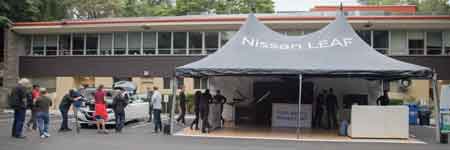
        <![CDATA[<p>At the <a href="https://driveelectricweek.org/">National Drive Electric Week</a> event in <a href="https://driveelectricweek.org/event.php?eventid=1023">Seattle</a>, Cathy and I saw the newly-announced but not yet available <a href="https://www.nissanusa.com/electric-cars/2018-leaf/">2018 Nissan LEAF</a>. At that event, we signed up for a test drive.</p>
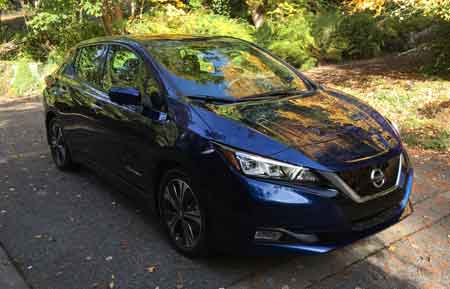
<p><img alt="ndew-seattle.jpg" src="https://saxton.org/tom_saxton/images/ndew-seattle.jpg/ndew-seattle.jpg" class="mt-image-center" style="text-align: center; display: block; margin: 0 auto 20px;" width="450" height="150" />Today, October 23, 2017, Jose pulled up in front of our house in a beautiful blue Nissan LEAF for our test drive. We spent about an hour going over the vehicle and then out for a drive. Jose was enthusiastic and very knowledgeable about the car. We have a 2011 LEAF, so I'm familiar with that but haven't driven any of the newer LEAFs, so that's my perspective.</p>
<p><img alt="blue-2018-leaf.jpg" src="https://saxton.org/tom_saxton/images/blue-2018-leaf.jpg" class="mt-image-center" style="text-align: center; display: block; margin: 0 auto 20px;" width="450" height="289" /><strong>Back Seat</strong></p>
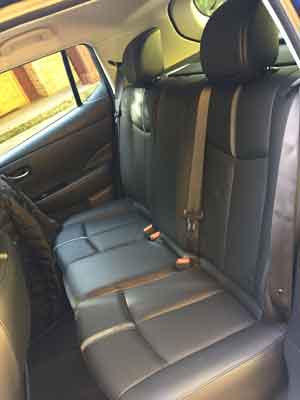
<p>The LEAF claims to be a 5-passenger vehicle, but the middle back seat has no head rest, so no neck protection in a rear-end collision. We often have 5 adults in the car, so that matters to us. I've been especially aware of this since we were rear-ended this summer. Fortunately, it was just the two of us in the car at the time, and neither of us were injured. My head hit the head rest pretty hard, so I'm glad it was there. I can't understand why Nissan doesn't protect the middle seat passenger.</p>
<p><img alt="back-seat.jpg" src="https://saxton.org/tom_saxton/images/back-seat.jpg" class="mt-image-center" style="text-align: center; display: block; margin: 0 auto 20px;" width="300" height="400" /><strong>Charge Cord</strong></p>
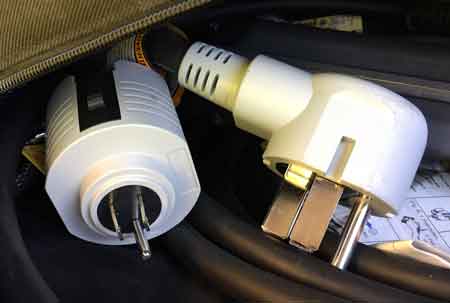
<p>The SV and SL packages include a dual Level 1 (120V)/Level 2 (240V) charge cord. The standard 120V plug comes off to reveal a NEMA 14-50 240V plug.</p>
<p><img alt="charge-cord.jpg" src="https://saxton.org/tom_saxton/images/charge-cord.jpg" class="mt-image-center" style="text-align: center; display: block; margin: 0 auto 20px;" width="450" height="303" />With so much public charging available now, there's not much need for Level 2 charging away from home, but the dual mode cord means an owner can upgrade their home charging to 240V by just installing a NEMA 15-40 outlet.</p>
<p><strong>Quiet Ride</strong></p>
<p>When we started the test drive, right away I noticed how quiet it is. I'm told it has the same pedestrian warning sound as the 2011 model, but I couldn't hear it or the inverter whine which are pretty apparent in the 2011. I used to think our LEAF was quiet, but the 2018 is amazingly quiet. There was just the barest hint of a sound at low speeds in the driveway, maybe the pedestrian warning or the electronics, but much quieter. Likewise for road noise at freeway speeds, much quieter than our old LEAF.</p>
<p><strong>One Pedal Driving</strong></p>
<p>One of the best things about the electric driving experience is one pedal driving. It's so natural: push the accelerator pedal to go faster, let up to go slower. With regenerative braking, an EV can be much smoother and natural than a gas car, can slow down on a steep hill without using the brakes, and cruise control can hold you at a steady speed up and down hills. Automakers seem to be afraid of taking full advantage of this feature for fear it will be unfamiliar to gas car drivers, but Nissan has fully embraced it in the new LEAF. In the 2018, I was able to bring the car to a full stop on the steepest part of our driveway. Amazing! At the bottom of our drive, I brought it to a full stop, nudged it forward to look around our mailbox for traffic, then eased onto the road, all using just the accelerator pedal.</p>
<p>Nissan calls this feature ePedal. It can be turned on and off, and can be set to on or off by default. So, gas car drivers can test drive the car without it, then turn it on when they are ready to try driving a car with a superior drivetrain. For most people, once you get used to one-pedal driving, you'll find a gas car feels outdated and you'll never want to go back.</p>
<p><strong>Analog Speedometer</strong></p>
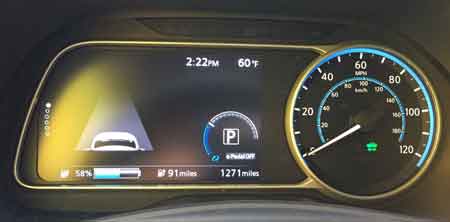
<p>The 2018 LEAF drops the large, easy-to-read digital speedometer for a boring analog speedometer. Jose tells me that Nissan thinks people don't like the digital speedometer, that it doesn't provide feedback on acceleration the way an analog speedometer does. I like the digital speedometer and find that having my back pressed into the seat is all the feedback I need on acceleration.</p>
<p><img alt="speedometer.jpg" src="https://saxton.org/tom_saxton/images/speedometer.jpg" class="mt-image-center" style="text-align: center; display: block; margin: 0 auto 20px;" width="450" height="222" /><strong>ProPilot</strong></p>
<p>Nissan did a demo of autoparking at the worldwide announcement, but that feature is only available in Japan, not the United States. Jose gave me the lame company line that US drivers don't use the autoparking feature; maybe we'll get it later. I don't know what the real story is, but that's nonsense.</p>
<p>We got on the freeway and I engaged the ProPilot cruise control feature. As with any cruise control, you get to the speed you want then hit a button. The car will keep you at that speed when it can, but responds to traffic and slows down when there's a slower car in front of you, then speeds back up when the road is clear. It also detects the lane lines on the road and keeps the car centered in the lane. Despite being a nice, sunny afternoon with clearly visible lines on the freeway, the car lost the vision lock a few times and I had to take control. It did slow down when a slower car got in front of us.</p>
<p>It seemed to me like the car was keeping us to the left of center in the lane. Maybe its sensors are better than mine, but I found it a little unnerving when we had a giant semi slowly pass us on the left. I didn't like being so close and took control to put us more center-right in the lane.</p>
<p>When we exited the freeway, I left the ProPilot cruise control on which arguably isn't how it's intended to be used. The exit peels off very gradually for a pretty long, straight stretch. That was working fine, the ProPilot was slowing down to match the car in front of us. As the lane made a gradual curve to the right, the car in front of us was no longer directly ahead, so the LEAF tried to resume full speed. It clearly didn't understand that the lane was curving and that slow car was still in front of us. I disabled the ProPilot at that point.</p>
<p>Maybe it would be cool on a long freeway run, but I found the ProPilot to be too unreliable to really relax and let it drive.</p>
<p>Even when the ProPilot isn't engaged, it watches the road and warns you if you drift in the lane. That happened twice to me, once when I was a little off center and again when the road was curving and I thought I was in the right place.</p>
<p><strong>All-Around Camera</strong></p>
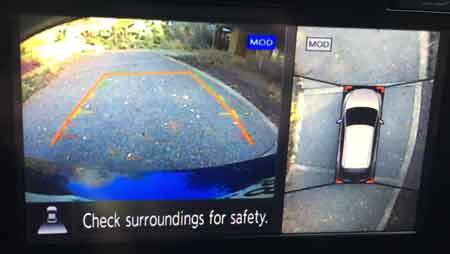
<p>When we got back to the house, I tried out the all-around camera (SL package only). When you pop the LEAF into reverse, the center console screen shows both the backup camera and a simulated overhead view that displays the car's full surroundings. I know the LEAF has had a feature like this available for a few years, but it was super cool to see it in action. It was just like there was a camera over the car looking down to show the car's position in the driveway. It's done with four side camera and math, a very nice effect.</p>
<p><img alt="rear-camera.jpg" src="https://saxton.org/tom_saxton/images/rear-camera.jpg" class="mt-image-center" style="text-align: center; display: block; margin: 0 auto 20px;" width="450" height="254" /><strong>Bluetooth Audio</strong></p>
<p>I paired my iPhone 6 up to the car to play some music. That works great, with plenty of volume. The Tesla Model S fails the "enough volume" test when playing Bluetooth from an iPhone. So that was nice.</p>
<p><strong>Premium Bose Sound System</strong></p>
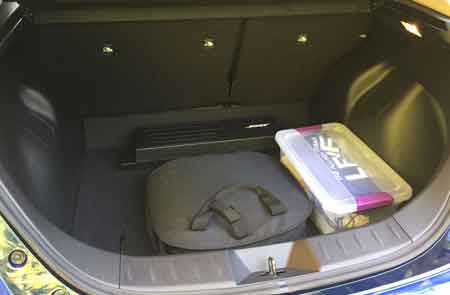
<p>The test drive vehicle was a top-of-the-line SL with all the bells and whistles, including a super-duper Bose sound system which eats up a small slice of the hatch with amplifiers. When I had my iPhone hooked up, I played some Led Zeppelin and found the sound underwhelming. Our Tesla Roadster has a good sound system, with an Alpine headunit we installed. Those Zeppelin tunes sound great there, one of the pleasures of driving the Roadster. Not so much in the LEAF.</p>
<p><img alt="trunk-cord-bose.jpg" src="https://saxton.org/tom_saxton/images/trunk-cord-bose.jpg" class="mt-image-center" style="text-align: center; display: block; margin: 0 auto 20px;" width="450" height="295" /></p>
<p><strong>Heated Seats<br /></strong></p>
<p>We put in a very early order for our 2011, but then postponed it until they came out with the cold weather package late in the 2011 model year. Heated seats are a big win in an electric vehicle because they are more energy efficient than cabin heating, and the heated steering wheel is a guilty pleasure we love. The 2018 offers heated seats and steering wheel with the all-weather package, but it doesn't heat the rear seats. We use our LEAF in the winter and don't want to leave our rear-seat passengers in the cold. With the bigger battery, using the less efficient cabin heater is less of an issue, but we like offering heated seats to our rear-seat passengers.</p>
<p><strong>Summary</strong></p>
<p>Overall, the 2018 is a huge upgrade from our 2011. Not only the increased range from 84 miles to 150 miles (EPA rated range), but amazing one-pedal driving, nicely improved sound insulation and plenty of cool tech available in the higher package levels. Unfortunately, the lack of a fifth headrest makes us less interested in upgrading to a new LEAF.</p>]]>
        
    </content>
</entry>

<entry>
    <title>OVMS and the Tesla Roadster Charge Time Predictor</title>
    <link rel="alternate" type="text/html" href="https://saxton.org/tom_saxton/2013/12/roadster-ctp.html" />
    <id>tag:www.saxton.org,2013:/tom_saxton//2.52</id>

    <published>2013-12-08T23:50:00Z</published>
    <updated>2016-05-19T18:23:15Z</updated>

    <summary>Updated April 14, 2014 to add section on charging efficiency.Charging an electric vehicle is pretty easy: just like my cell phone, I plug it in when I get home and it&apos;s fully charged in the morning. It doesn&apos;t matter how...</summary>
    <author>
        <name>Tom Saxton</name>
        
    </author>
    
    
    <content type="html" xml:lang="en-us" xml:base="https://saxton.org/tom_saxton/">
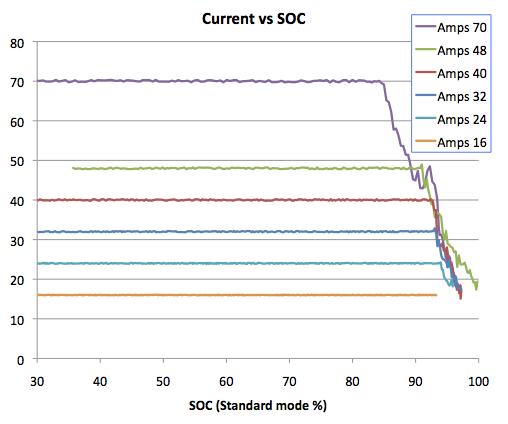
        <![CDATA[<div><i>Updated April 14, 2014 to add section on charging efficiency.</i></div><div><br /></div>Charging an electric vehicle is pretty easy: just like my cell phone, I plug it in when I get home and it's fully charged in the morning. It doesn't matter how long it takes because I'm not waiting for it to finish; the car just charges up and waits for me.<div><br /></div><div>That's pretty much the whole story for local driving, but I like driving electric so much I prefer to do longer trips electrically rather than burning gas. On those longer trips, it can be helpful to know how long a charge will take. To help figure out charge times in our Roadster, I did a study in 2010 on how charge rates and energy efficiency vary with available power and published a <a href="https://saxton.org/tom_saxton/2010/07/tesla-roadster-charging-rates.html">blog with the results</a>. That blog has a table that shows charge rates for various charge rates from 120V/12A up to 240V/70A.</div><div><br /></div><div>
<table class="grid" align="center">
	<tbody>
	<tr class="row_header">
		<td rowspan="2">Charge Rate</td> <td rowspan="2">Ideal Miles<br />per Hour</td> <td colspan="4">Current Tapering Begins At:</td>
	</tr>
	<tr class="row_header">
		<td>Std %</td> <td>Std IM</td> <td>Range %</td> <td>Range IM</td>
	</tr>
	<tr class="groupdiv">
		<td class="num">120V -&nbsp;12A</td>
		<td class="num">3.3</td>
		<td class="num"></td>
		<td class="num"></td>
		<td class="num"></td>
		<td class="num"></td>
	</tr>
	<tr>
		<td class="num">120V -&nbsp;16A</td>
		<td class="num">5.1</td>
		<td class="num"></td>
		<td class="num"></td>
		<td class="num"></td>
		<td class="num"></td>
	</tr>
	<tr>
		<td class="num">240V -&nbsp;16A</td>
		<td class="num">13</td> <td class="num">93</td>
		<td class="num">179</td> <td class="num">82</td>
		<td class="num">205</td>
	</tr>
	<tr>
		<td class="num">240V -&nbsp;24A</td> <td class="num">20</td> <td class="num">94</td> <td class="num">180</td> <td class="num">82</td> <td class="num">205</td>
	</tr>
	<tr>
		<td class="num">240V -&nbsp;32A</td> <td class="num">28</td> <td class="num">93</td> <td class="num">178</td> <td class="num">82</td> <td class="num">207</td>
	</tr>
	<tr>
		<td class="num">240V -&nbsp;40A</td> <td class="num">36</td> <td class="num">93</td> <td class="num">178</td> <td class="num">81</td> <td class="num">204</td>
	</tr>
	<tr>
		<td class="num">240V -&nbsp;48A</td> <td class="num">42</td> <td class="num">91</td> <td class="num">174</td> <td class="num">80</td> <td class="num">201</td>
	</tr>
	<tr>
		<td class="num">240V -&nbsp;70A</td> <td class="num">61</td> <td class="num">84</td> <td class="num">161</td> <td class="num">75</td> <td class="num">188</td>
	</tr>
	</tbody>
</table>
<br /></div><div>
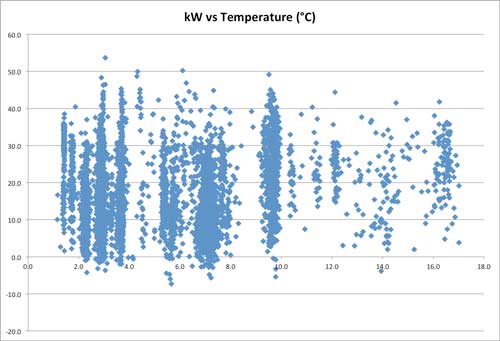
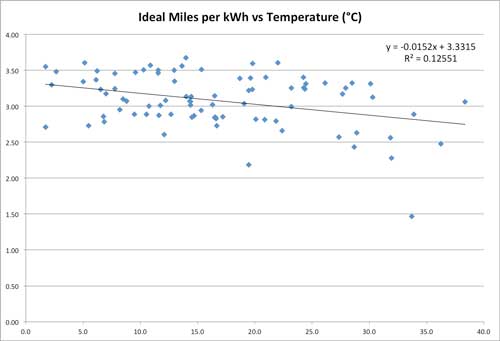
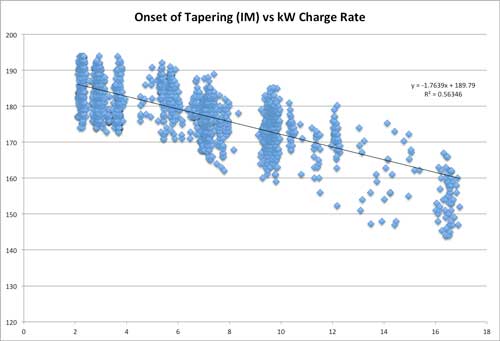
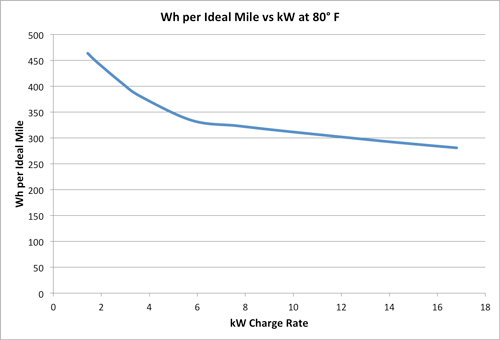
That charge rate table is handy, but it has some limitations:</div><div><br /></div><div><ul><li>It's a pain to load up the web page and do the math.</li><li>It covers the full range of charging options from the lowest to highest power rates, but it doesn't cover every possible rate, e.g. lots of sites are on 208V circuits instead of 240V.</li><li>It's specific to our car and the moderate temperatures in our garage.</li></ul></div><div><br /></div><div>The situation also gets more complex as the charge gets near the top and the car starts tapering the charge rate to pamper the battery pack, so calculating the charge time to full is more complicated than just looking at the available power. The graph below from the original study shows how the charge rate tapers down from various power levels.</div><div><br /></div><div><span class="mt-enclosure mt-enclosure-image" style="display: inline;"><img alt="Tesla_Amps_vs_SOC.png" src="https://saxton.org/tom_saxton/images/Tesla_Amps_vs_SOC.png" class="mt-image-center" style="text-align: center; display: block; margin: 0 auto 20px;" height="424" width="508" /></span></div><div>Finally, since the Roadster has an active thermal management system that cools (or heats) the pack to keep the battery temperature in the best range, and that system uses power, the charge rate also depends on temperature, something my original study didn't address at all.</div><div><br /></div><div>To build a more complete charge time predictor, I'd need to get charge data across a wide range of power levels and ambient temperatures, develop a charge tapering profile to use for calculating time-to-full, and I'd need to do this for each of the Roadster's three charging modes. This would require capturing a giant amount of charge data, which would need to come from Roadsters in different climates since the temperature in our Pacific Northwest garage doesn't vary much.</div><div><br /></div><div><b><font style="font-size: 1.25em;">Open Vehicle Monitoring System</font></b></div><div><br /></div><div>The <a href="http://openvehicles.com/">Open Vehicle Monitoring System</a>&nbsp;(OVMS) is an open source hardware and software project created by Mark Webb-Johnson, based in part on earlier work done by Scott Swazey who created the <a href="http://www.teslamotorsclub.com/showthread.php/5055-New-cell-phone-app-Tesla-Tattler-works-on-all-cell-phones">Tesla Tattler</a>. OVMS consists of a $130 device that plugs into the car to both collect information and send commands. The device can interact with the driver via SMS messages and/or relay through a web server which communicates with smartphone apps. Since initial deployment on the Roadster, OVMS has been expanded to <a href="http://openvehicles.com/vehiclesupport">support other vehicles</a>, all through volunteer support from vehicle owners.</div><div><br /></div><div>Because the device sends data to a server and that data is stored (for a limited time period), there was a vast amount of charge data accumulated ready to be studied. Mark was kind enough to get me an anonymized capture of that data, 179 MB of data from 126 devices. The data is stripped of all identifying information, so I can't tell anything about the car or owner: no location or even VIN number. I can't tell if a given car is an early Roadster 1.5 in southern California, or a late 2.5 in Norway. What I get is records about every 10 minutes while the car is charging that tells me the time, SOC %, ideal miles, charge mode, charge voltage and amperage, various temperature readings, and the odometer.</div><div><br /></div><div><b><font style="font-size: 1.25em;">Analyzing Charge Rates</font></b></div><div><br /></div><div>I was able to extract data on just over 7,000 usable charging sessions. The graph below shows the available kW vs. temperature for each session. If you don't speak Celsius, 0°C is 32°F and 40°C is 104°F. Temperatures that are much above 40°C are probably due to situations where the Roadster ambient temperature sensor is sitting in direct sunlight on a hot day.</div><div><br /></div><div><span class="mt-enclosure mt-enclosure-image" style="display: inline;"><img alt="kW-v-temp.jpg" src="https://saxton.org/tom_saxton/photos/ctp/kW-v-temp2.jpg" class="mt-image-center" style="text-align: center; display: block; margin: 0 auto 20px;" height="341" width="500" /></span></div><div><span class="mt-enclosure mt-enclosure-image" style="display: inline;">You can see clusters around common charge rates. The two lowest groups are at 1.44 kW (</span>120V/12A)<span style="font-size: 1em;">&nbsp;and 1.92 kW (</span>120V/16A)<span style="font-size: 1em;">, and there are big groups around 7 kW (240V/30A) and 9.6 kW (240V/40A).</span></div><div><span class="mt-enclosure mt-enclosure-image" style="display: inline;"><br /></span></div><div><span class="mt-enclosure mt-enclosure-image" style="display: inline;">I wrote code to march through the data, identify records that correspond to each charge session, calculate the charge rate for the portion of each charge where the car is drawing the maximum allowed current for a steady power level, and note where tapering begins. I then sliced the data to see how temperature affects the charge rate at a given charge level. For example, the graph below shows the steady power charge rate (in ideal miles per kWh) vs. the average ambient temperature sensor reading for all of the charge sessions between 6.8 and 7.2 kW.</span></div><div><span class="mt-enclosure mt-enclosure-image" style="display: inline;"><br /></span></div><div><span class="mt-enclosure mt-enclosure-image" style="display: inline;"><img alt="charge-rate-7kwh.jpg" src="https://saxton.org/tom_saxton/tesla/ctp/charge-rate-7kwh.jpg" class="mt-image-center" style="text-align: center; display: block; margin: 0 auto 20px;" height="341" width="500" /></span></div><div><span class="mt-enclosure mt-enclosure-image" style="display: inline;">The data shows a slight downward trend in charge rate with increasing temperature, which is reflected by the downward slope of the best-fit straight line approximation to the data. There is, however, a lot of variation in the data. Other factors (battery temperature, enclosed or open-air charging, battery pack starting temperature, etc.) have more effect on the charge rate than what can be predicted by knowing the average ambient temperature sensor reading during the charge, so the model can't predict differences in charge times from those external factors.</span></div><div><span class="mt-enclosure mt-enclosure-image" style="display: inline;"><br /></span></div><div><span class="mt-enclosure mt-enclosure-image" style="display: inline;">Using this data slicing, I was able to build a model that predicts the steady-state charging rate for power levels from 1.4 to 16.8 kW. The model incorporates a reasonable data set from a little below freezing to 40° C (104° F). Beyond that temperature range, there's isn't a lot of supporting data, so the model doesn't cover cases where battery heating is required or where battery cooling is extreme.</span></div><div><span class="mt-enclosure mt-enclosure-image" style="display: inline;"><br /></span></div><div><span class="mt-enclosure mt-enclosure-image" style="display: inline;"><b><font style="font-size: 1.25em;">Modeling Charge Tapering</font></b></span></div><div><span class="mt-enclosure mt-enclosure-image" style="display: inline;"><br /></span></div><div><span class="mt-enclosure mt-enclosure-image" style="display: inline;">To figure out tapering curves, I looked at the onset of tapering for each charge mode. Below is the graph of the standard mode data showing the ideal miles at which tapering begins by charge rate.</span></div><div><span class="mt-enclosure mt-enclosure-image" style="display: inline;"><br /></span></div><div><span class="mt-enclosure mt-enclosure-image" style="display: inline;"><img alt="Std-Mode-Taper-Onset.jpg" src="https://saxton.org/tom_saxton/roadster/ctp/Std-Mode-Taper-Onset.jpg" class="mt-image-center" style="text-align: center; display: block; margin: 0 auto 20px;" height="341" width="500" /></span></div><div><span class="mt-enclosure mt-enclosure-image" style="display: inline;">Once again, you can see that there's a pretty clear trend, reflected by the best-fit straight line, but there's also a lot of variation. Part of the variation is because different cars have different capacities in their battery packs. A nominal new pack will charge up to about 192 ideal miles in Standard mode, but a more well-traveled pack might only charge up to 170 ideal miles. Those two packs will taper the charge rate differently. To build the tapering profile, I had to allow for differences in the capacity of the cars in the data set and adjust accordingly.</span></div><div><span class="mt-enclosure mt-enclosure-image" style="display: inline;"><br /></span></div><div><span class="mt-enclosure mt-enclosure-image" style="display: inline;"><b><font style="font-size: 1.25em;">The Charge Time Predictor</font></b></span></div><div><span class="mt-enclosure mt-enclosure-image" style="display: inline;"><br /></span></div><div>Doing this fairly giant amount of data analysis, I was able to build a charge time predictor function that is now incorporated in both OVMS and the Tesla Tattler. As you can see from the variation in the vehicle charging data, it's impossible to be perfect for every car, but the charge time predictor generally hits the mark within 30 minutes or 10% of the charge time. It doesn't do as well in temperatures below freezing or much above 100°F, or when the car is charging in a small, enclosed garage, or if the ambient temperature sensor doesn't reflect the actual air temperature, etc., but for common conditions, it seems to be doing a pretty good job.</div><div><br /></div><div>In addition to the general variation in the data, there's another issue that affects charge times. Occasionally, the Roadster will charge up to the expected charge level (ideal miles) in about the time I expect, but then keeps going. For example, our Roadster generally charges to about 180 ideal miles in Standard mode, but sometimes it will hit 180 and just keep going, perhaps taking another 30 or 40 minutes to finish, showing a charge level that's wildly implausible, like over 190 ideal miles. Ten minutes after the charge, when the car recomputes the actual energy in the battery based on post-charging data, the charge level will drop back to the expected level. So these exceptionally long charge sessions don't seem to actually put any extra energy into the pack, despite the end-of-charge reading. I suspect the car is leveling the individual brick charge levels. When this happens and makes the charge run late, if I need to leave, I just interrupt the charge and go.</div><div><br /></div><div><b><font style="font-size: 1.25em;">Good for the Driver, the Car, and the Utility</font></b></div><div><br /></div><div>Having a charge time predictor enables a whole new charging feature: the ability to set the end time for a charge. This is important for two reasons.</div><div><br /></div><div>First, when I'm doing a full range mode charge prior to a long drive, I'd really like the charge to finish shortly before I'm ready to leave. When charged to full, the Roadster runs the coolant pump to keep the battery temperature cool and equalized, which drains power. I'd rather be driving on those electrons for both the added range and energy efficiency.</div><div><br /></div><div>Second, it's nice for the utility. Since we first got the Roadster, we've used the built-in charge timer to delay charging until off-peak hours. Our utility doesn't have time-of-use (TOU) rates, so we don't get any financial benefit, but it's still the right thing to do. Unfortunately, this creates a problem as we get more EVs on the road. If everyone sets their car to charge at some even hour, like midnight, that creates a surge for the utility. In areas where TOU rates are in effect, you can see this effect in the data collected by <a href="http://www.theevproject.com/">the EV Project</a>. Using the charge time predictor with the new OVMS "charge by" feature, I can set the charge to end around a specific time, so the start time varies with how much energy I use driving each day. Since the actual charge time varies from the predicted time, even the end time varies, so there won't be a big instant spike or drop at either end of the charge for vehicles that set a charge end timer. That's good for the grid.</div><div><br /></div><div><b><font style="font-size: 1.25em;">Charging Efficiency</font></b></div><div><br /></div><div>Although not directly related to charge time prediction, the data set also allows for examining how charge rate effects efficiency. Using the model developed for the charge time predictor, the graph below shows how charging efficiency varies with charge rate. Charging efficiency is expressed as Wh per ideal mile, so smaller numbers are better.</div><div><br /></div><div><span class="mt-enclosure mt-enclosure-image" style="display: inline;"><img alt="Wh-per-IM.png" src="https://saxton.org/tom_saxton/tesla/ctp/Wh-per-IM.png" class="mt-image-center" style="text-align: center; display: block; margin: 0 auto 20px;" height="340" width="500" /></span></div><div><span class="mt-enclosure mt-enclosure-image" style="display: inline;">This shows that in moderate temperatures, charging efficiency increases with charge rate. There's a huge improvement between 120V/15A (1.44 kW) and 240V/24A (7.68 kW), but after that there's a much more gradual improvement with increasing charge rates.</span></div><div><span class="mt-enclosure mt-enclosure-image" style="display: inline;"><br /></span></div><div><b><font style="font-size: 1.25em;">Availability</font></b></div><div><br /></div><div>The charge time predictor for the Tesla Roadster is available in the latest firmware versions of OVMS and the Tesla Tattler and also on the <a href="https://idleloop.com/tesla/ctp.php">Tesla Roadster Charge Time Predictor page</a>.</div><script id="hiddenlpsubmitdiv" style="display: none;"></script><script>try{for(var lastpass_iter=0; lastpass_iter < document.forms.length; lastpass_iter++){ var lastpass_f = document.forms[lastpass_iter]; if(typeof(lastpass_f.lpsubmitorig2)=="undefined"){ lastpass_f.lpsubmitorig2 = lastpass_f.submit; lastpass_f.submit = function(){ var form=this; var customEvent = document.createEvent("Event"); customEvent.initEvent("lpCustomEvent", true, true); var d = document.getElementById("hiddenlpsubmitdiv"); if (d) {for(var i = 0; i < document.forms.length; i++){ if(document.forms[i]==form){ d.innerText=i; } } d.dispatchEvent(customEvent); }form.lpsubmitorig2(); } } }}catch(e){}</script>]]>
        
    </content>
</entry>

<entry>
    <title>The Hybrid Garage</title>
    <link rel="alternate" type="text/html" href="https://saxton.org/tom_saxton/2012/11/the-hybrid-garage.html" />
    <id>tag:www.saxton.org,2012:/tom_saxton//2.51</id>

    <published>2012-11-10T18:26:35Z</published>
    <updated>2012-12-11T00:27:43Z</updated>

    <summary>Electric vehicles are awesome for local driving. Driving within the single-charge range of an electric vehicle is more fun, more convenient, and cheaper than driving a gas car. Many people are drawn to the idea that they can abandon gas...</summary>
    <author>
        <name>Tom Saxton</name>
        
    </author>
    
    
    <content type="html" xml:lang="en-us" xml:base="https://saxton.org/tom_saxton/">
        <![CDATA[Electric vehicles are awesome for local driving. Driving within the single-charge range of an electric vehicle is more fun, more convenient, and cheaper than driving a gas car. Many people are drawn to the idea that they can abandon gas stations, fuel at home, drive 130 miles for the cost of a gallon of gas and all in a car that has a quiet ride and instant, smooth acceleration that can't be matched by a gas car.<div><br /></div><div>However, electric cars are not great for driving long distances beyond their single-charge range. Make no mistake, electric road trips can be done. Plenty of EV owners love driving electric so much they are willing to trade off some convenience for the rewards of driving without combustion, but that's a choice. People who haven't previously owned an EV aren't going to sign up for that when they buy their first.</div><div><br /></div><div><b><font style="font-size: 1.25em; ">The Plug In Hybrid</font></b></div><div><br /></div><div>The solution to this that first comes to mind for many people is a plug-in hybrid vehicle. The Chevy Volt is an electric vehicle that has a gas engine that can be used to extend the range of the car, both by augmenting the electric motor and charging the battery. Especially for single car households, the Volt can be an excellent solution: drive electric for your daily commute and burn gas for longer trips. The trade off is that the Volt is more expensive than an all-electric Nissan Leaf, has less than half the electric range, and still needs regular maintenance&nbsp;like oil changes.</div><div><br /></div><div><b><font style="font-size: 1.25em; ">No Car Does Everything Well</font></b></div><div><br /></div><div>The issue of a diversity of demands from a single vehicle is not a problem that's unique to electric cars. No car is great for every purpose. You can't carry more than two people or tow a boat with a Miata. A 15 mpg pickup truck is pretty silly as a single-occupant urban commuter vehicle.</div><div><br /></div><div>Households that own more than one vehicle have the opportunity to own different types of vehicles which excel at different tasks. A household might own a small, economical sedan for daily driving and a more rugged vehicle for excursions into the wilderness.</div><div><br /></div><div><b><font style="font-size: 1.25em; ">The Hybrid Garage</font></b></div><div><br /></div><div>Some 60% of Americans have a garage and multiple cars and 78% drive less than 40 miles per day. The tens of millions of American, and many more worldwide, who are in both groups are perfect candidates for what I call the "hybrid garage."</div><div><br /></div><div>The hybrid garage is replacing one of your gas cars with an all-electric car, keeping a gas car that's good for the things the EV doesn't do well. There are several potential advantages to the hybrid garage over owning a plug-in hybrid car: you get more electric range for the car's purchase price, you don't have to do oil changes on the electric car, and you don't have to worry about gas going bad because it just sits in the tank for months.</div><div><br /></div><div>Even a single-car household can adopt the hybrid garage approach. Depending on how often a longer-range vehicle is needed, renting a car occasionally may be a lot cheaper than owning a second car. Swapping cars with a friend or relative can take care of the occasional road trip, and allow someone else to see first hand how convenient driving electric is.</div><div><br /></div><div><b><font style="font-size: 1.25em; ">Who Gets to Drive the EV?</font></b></div><div><br /></div><div>There is a downside to the hybrid garage: once you have an electric car in the garage and people find out how nice it is to drive electric, everyone will want to drive that car. Fortunately there's an easy solution that Cathy and I developed after we bought our first electric car: whoever is driving farther gets the electric car. This also turns out to be the cure for range anxiety. When you realize how much of your driving can be done with a car that has a "limited range" you'll stop worrying about running out of juice and wonder how it is that we got so used to tolerating the inconvenience of driving on gasoline.</div>]]>
        
    </content>
</entry>

<entry>
    <title>Quiet Vehicles and Pedestrians</title>
    <link rel="alternate" type="text/html" href="https://saxton.org/tom_saxton/2012/09/quiet-vehicles.html" />
    <id>tag:www.saxton.org,2012:/tom_saxton//2.50</id>

    <published>2012-09-14T19:09:36Z</published>
    <updated>2012-09-14T20:19:19Z</updated>

    <summary>I&apos;ve been driving electric vehicles since 2008, logging over 50,000 miles, and have never had an experience where my vehicle&apos;s lack of engine noise created an unsafe situation. However, the issue of quiet vehicles and pedestrians is subtle and complex.I...</summary>
    <author>
        <name>Tom Saxton</name>
        
    </author>
    
    
    <content type="html" xml:lang="en-us" xml:base="https://saxton.org/tom_saxton/">
        <![CDATA[I've been driving electric vehicles since 2008, logging over 50,000 miles, and have never had an experience where my vehicle's lack of engine noise created an unsafe situation. However, the issue of quiet vehicles and pedestrians is subtle and complex.<br /><br />I have had a pedestrian walk backwards through the traffic lane in a parking lot while carrying on a conversation with someone across the lot. She didn't notice my vehicle, but I was watching where I was driving and going slow enough to react to her carelessness. I just stopped and waited about 30 seconds for her to see me. She of course made a rude comment blaming me for the unsafe situation <i>she</i> caused.<br /><br />I've also had many times when driving through a parking garage where pedestrians are walking up the middle of the traffic lane, totally oblivious to my presence. However I find that happens with about the same frequency it did when I was driving gas cars, which I attribute to the echoing in concrete garages making it hard to hear slow-moving vehicles from behind, even when they are close.<br /><br />I've also had the experience of being in a shopping center parking lot, hearing a car drive up behind me, and before turning around knowing it was my wife, Cathy, because I recognized the distinctive sound of a Tesla Roadster. On the flip side, Cathy has noticed not being able to hear a nearby gas car in a parking lot because of the noise made by a much louder gas car an aisle or two over.<br /><br />As a responsible driver, I don't depend on pedestrians hearing the roar of my engine so they can scramble out of my way before I mow them over. But the situation is more complex than just my personal experience.<br /><br />In May of 2011, I participated in a <a href="http://www.unece.org/fileadmin/DAM/trans/doc/2011/wp29grb/QRTV-06-01e.pdf">meeting of the United Nations working group</a> that is developing a proposal for an international standard for quiet vehicles. There I learned a great deal about the subject and was able to share my insights as an experienced electric vehicle driver.<br /><br />The predominant sound made by cars moving above 15 to 20 miles per hour is tire noise. At slower speeds, it's engine idling, fans, and so forth. It's those lower speeds that are of concern.<br /><br />Hybrid and electric vehicles aren't the only quiet vehicles on the road. Many modern sedans are also virtually silent at low speeds where tire noise is not significant. Therefore, the UN is taking a broader approach to this problem than the <a href="http://www.govtrack.us/congress/bills/111/s841">US Pedestrian Safety Enhancement Act of 2010</a>, which only considers minimum noise levels for electric and hybrid vehicles.<br /><br />The sound made by gas cars is actually quite poor for alerting pedestrians to nearby vehicle traffic. Most of the sound made by internal combustion vehicles is low-frequency, which humans have difficulty locating, and carries for long distances, adding to ambient noise levels that can mask out nearby vehicles.<br /><br />For an artificial car sound to be effective, it has to be localizable and distinguishable as coming from a vehicle. So having an EV rumble like a muscle car or chirp like a bird is a terrible idea. Studies presented at the UN workgroup meeting show that the best sounds are broad spectrum sounds without low frequency content.<br /><br />The issue is even more complex for blind pedestrians who develop skills in using their senses in ways that are completely outside the experience of the sighted public. The idling sounds made by stationary vehicles are useful not only for detecting the presence of nearby cars, but also for using them as positional markers. Consider walking across a wide, busy street and trying to stay in the crosswalk with your eyes closed. The sound of the idling cars nearest the crosswalk act as navigational beacons, keeping blind pedestrians from drifting out of the crosswalk and into traffic. For this reason, it's important to be able to hear a car in the street even if it is not moving.<br /><br />It's also important to be able to judge the size of vehicles by their sound. Drivers behind a large, stopped vehicle can get impatient at the hold-up and decide to blast around the unwanted obstruction, only to find that there was a good reason for the large vehicle to be stopped: pedestrians in a crosswalk. For this reason, blind pedestrians may choose to avoid this risk by choosing not to cross when they hear a large vehicle at the head of the line.<br /><br />As an EV driver, I appreciate the quiet ride of electric cars. The last thing I want is some obnoxious artificial sound added to my car. From what I learned at the working group meeting, a properly 
designed sound doesn't have to be overly loud, it can be effective even at a sound level that is below the ambient noise level. I believe we can add sound to quiet cars to increase pedestrian safety without compromising the advantage of electric cars in improved driving experience and reduced noise pollution, but doing so demands careful thought and consideration of many complex issues. ]]>
        
    </content>
</entry>

<entry>
    <title>Quick Chargers: Ignore The Charge Percent!</title>
    <link rel="alternate" type="text/html" href="https://saxton.org/tom_saxton/2012/09/dcqc-soc.html" />
    <id>tag:www.saxton.org,2012:/tom_saxton//2.49</id>

    <published>2012-09-04T16:37:53Z</published>
    <updated>2013-03-24T17:46:33Z</updated>

    <summary> Electric vehicle drivers are excited to see the first DC Quick Charge stations coming online. Oregon and Washington have done their part to power up the West Coast Electric Highway allowing electric vehicle drivers to travel I-5 from the...</summary>
    <author>
        <name>Tom Saxton</name>
        
    </author>
    
    
    <content type="html" xml:lang="en-us" xml:base="https://saxton.org/tom_saxton/">
        <![CDATA[


<style>
<!--table
	{mso-displayed-decimal-separator:"\.";
	mso-displayed-thousand-separator:"\,";}
td
	{padding:0px;
	mso-ignore:padding;
	color:windowtext;
	font-size:9.0pt;
	font-weight:400;
	font-style:normal;
	text-decoration:none;
	font-family:Geneva;
	mso-generic-font-family:auto;
	mso-font-charset:0;
	mso-number-format:General;
	text-align:general;
	vertical-align:bottom;
	border:none;
	mso-background-source:auto;
	mso-pattern:auto;
	mso-protection:locked visible;
	white-space:nowrap;
	mso-rotate:0;}
.xl25
	{font-size:10.0pt;
	font-family:Monaco;
	mso-generic-font-family:auto;
	mso-font-charset:0;
	mso-number-format:"\@";}
ruby
	{ruby-align:left;}
rt
	{color:windowtext;
	font-size:8.0pt;
	font-weight:400;
	font-style:normal;
	text-decoration:none;
	font-family:Verdana;
	mso-generic-font-family:auto;
	mso-font-charset:0;
	mso-char-type:katakana;
	display:none;}
--></style><font style="font-size: 1.5625em;"><b></b></font>Electric vehicle drivers are excited to see the first DC Quick Charge stations coming online. Oregon and Washington have done their part to power up the West Coast Electric Highway allowing electric vehicle drivers to travel I-5 from the Canadian border to the Oregon-California border and take advantage of stations that can charge a Nissan LEAF or Mitsubishi iMiEV from empty to 80% in about half an hour. This greatly increases the usable range of electric vehicles for longer trips and also provides a safety net for rare situations when drivers unexpectedly need more than their normal overnight charge.<br /><br />Unfortunately, there's a problem that is causing a lot of confusion that
 can result in a driver getting less charge than needed. Even though the
 stations are working properly, drivers may think something went wrong 
because of a user interface issue.<br /><br /><span class="mt-enclosure mt-enclosure-image" style="display: inline;"></span><span class="mt-enclosure mt-enclosure-image" style="display: inline;"><img alt="AV-DCQC-Screen.png" src="https://saxton.org/tom_saxton/photos/dcqc-soc/AV-DCQC-Screen.png" class="mt-image-center" style="text-align: center; display: block; margin: 0 auto 20px;" height="218" width="500" /></span>The above is the screen from an AeroVironment DC Quick Charge station in Tumwater, WA, as shown while charging our Nissan LEAF in June. The screen shows the driver two pieces of information: the amount of energy delivered to the car and a charge percent.<br /><br />The problem is the displayed charge percent: it is not the car's state of charge (SOC) and should not be treated as such by a driver to decide when to end the charge.<br /><br />It's pretty well known that it's difficult to determine the exact SOC of a car's battery. Even the best estimate of the battery's SOC may be off by a few percent. That's not what's going on here. The SOC value reported to the station is completely artificial and differs significantly from the car's estimate of the true SOC.<br /><br />In addition to showing the invalid SOC value to the driver, Blink quick charge stations also require the user to choose a station-controlled charge limit. This has two big problems. First, the LEAF wants to control the charge and will stop the charge at either 80% or near 100% based on the battery state at the start of the charge, so even if you choose 100% on the station the LEAF will terminate the charge at 80% if the car was at 50% or less when the charge started. Second, the Blink station doesn't know the real state of charge and therefore cannot know when to stop charging at the point it says it will.<br /><br />Here's an example. I recently used the Blink quick charge station at Harvard Market in Seattle, WA. I arrived with just over a half charge remaining, which means the LEAF will allow me to do a full quick charge up to near full capacity. After plugging in the car, the screen on the Blink station gave me a choice of charge levels, defaulting to 80%, which was the highest level shown. I had to press a "more options" button to be able to choose a 100% charge. The graph below shows data collected from the resulting 52-minute charge, comparing the car's actual SOC with the SOC shown on the station's screen.<br /><br /><span class="mt-enclosure mt-enclosure-image" style="display: inline;"><img alt="Blink_50_to_100_Graph.png" src="https://saxton.org/tom_saxton/photos/dcqc-soc/Blink_50_to_100_Graph.png" class="mt-image-center" style="text-align: center; display: block; margin: 0 auto 20px;" height="366" width="499" /></span>As you can see, not only is the reported SOC higher than the actual SOC, the reported SOC rises more quickly, increasing the gap as the charge progresses. Throughout the entire charge, the SOC shown on the station consistently overstates the actual charge level and the problem gets worse later in the charge period. As the car gets to about 80% actual SOC, the reported SOC jumps up to plateau near 100% and just sits there for the remainder of the charge, even though the car is far from fully charged.<br /><br />Had I left the default 80% setting, the charge would have stopped when the reported SOC hit 80%, but the car was really only at 73% at that time. A requested 90% charge would have stopped around 80% actual.<br /><br />Any driver who sees this behavior and doesn't know that the charge percent value on the station is not the SOC would see it jump up to 97%, perhaps watch it sit there for a few minutes, and likely decide that it would be a waste of time to spend any longer waiting for that last 3%. If the driver ends the charge at that point, the car will be missing perhaps 10% of the potential charge. If that last 10% is needed to finish the journey, this could result in a very unhappy EV driver.<br /><br />It's not clear where this value comes from, but displaying this invalid SOC on the quick charge stations has created user interface problem with unfortunate consequences for LEAF owners, and perhaps iMiEV owners as well.<br /><br />So to any EV driver using a CHAdeMO quick charge station that shows an SOC percentage:<br /><br />1. Ignore what the station shows. Put a sticky over it if you have to. Only look at the car's representation of the SOC.<br /><br />2. If the station offers you different charge levels, choose 100% charge so that you get the car's best available charge level. If you want to stop the charge early for some reason, do it based on the SOC shown by the car.<br /><br />I'll contact the quick charge station manufacturers to make sure they are aware of this problem. In the meantime, please help spread the word so EV drivers can get the maximum benefit from these highly valued stations.<br /><br />For charts of two AeroVironment quick charge sessions, see <a href="https://saxton.org/tom_saxton/2012/06/dcqc-roadtrip.html">Cathy Saxton's report</a>. More tips for using quick charge stations are available on our <a href="https://saxton.org/EV/quickcharging.php">Avoiding Quick Charging Pitfalls</a> page.<br /> ]]>
        
    </content>
</entry>

<entry>
    <title>US 2 DCQC Inaugural EV Rally</title>
    <link rel="alternate" type="text/html" href="https://saxton.org/tom_saxton/2012/07/us2-dcqc-rally.html" />
    <id>tag:www.saxton.org,2012:/tom_saxton//2.48</id>

    <published>2012-07-23T18:45:28Z</published>
    <updated>2012-07-23T22:47:40Z</updated>

    <summary>On Saturday, June 16, 2012, a dozen electric vehicles made the inaugural drive along US Highway 2 over the 4,061-foot summit at Stevens Pass utilizing the newly-installed quick charge stations. Most of these vehicles recorded data for driving and charging;...</summary>
    <author>
        <name>Cathy Saxton</name>
        
    </author>
    
    
    <content type="html" xml:lang="en-us" xml:base="https://saxton.org/tom_saxton/">
        <![CDATA[<p>On Saturday, June 16, 2012, a dozen electric vehicles made the inaugural drive along US Highway 2 over 
the 4,061-foot summit at Stevens Pass utilizing the newly-installed quick charge stations. Most of these 
vehicles recorded data for driving and charging; this blog is a summary and analysis of that data.</p>

<p class="caption">Cars charging at the DCQC and Level 2 stations in Skykomish, WA.</p>
<span class="mt-enclosure mt-enclosure-image" style="display: inline;"><img alt="US2qc-skykomish.jpg" src="https://saxton.org/tom_saxton/photos/us2/US2qc-skykomish.jpg" width="500" height="305" class="mt-image-none" style="margin:0; padding:0" /></span>
<br><br>

<p>We have analyzed this data as well as measurements from other driving and have created pages with information on planning an EV road trip, including guidelines for <a href="/EV/energyuse.php">predicting energy use</a> based on drive conditions and tips for <a href="/EV/quickcharging.php">avoiding quick charging pitfalls</a>.</p>

<p>Thanks to Ron Johnston-Rodriguez for all his work getting electric vehicle charging stations installed along 
US 2 and organizing this event.</p>

<h2>Route</h2>

<p>This event marked the official opening of DC quick charge (DCQC) stations in Sultan, Skykomish, Leavenworth, and Wenatchee, WA. It was also a test of the spacing between stations. Tom had helped with the US 2 electrification process by collecting data for driving this route in our Tesla Roadster in December, 2010, 
so we had good information on the energy use required for each segment.</p>

<p>With a carefully-orchestrated schedule from Ron, each vehicle was assigned a charging period at each station. This added a unique constraint, as vehicles would not necessarily have sufficient time for a full charge at the DCQC stations. We provided suggestions for a target charge level when departing each location and the expected energy required to comfortably reach the next station. The most demanding segment was the one over Stevens Pass; our guidance included a recommended state-of-charge level at the summit so drivers would know whether they should stop for Level 2 charging at Stevens Pass ski resort.</p>

<p class="caption">We got nifty SWAG from Leavenworth and Wenatchee!</p>
<span class="mt-enclosure mt-enclosure-image" style="display: inline;"><img alt="US2qc-goodies.jpg" src="https://saxton.org/tom_saxton/photos/us2/US2qc-goodies.jpg" width="500" height="447" class="mt-image-none" style="" /></span>
<br>

<h2>Cars</h2>

<p>We have data from 8 Nissan LEAFs, 1 Mitsubishi iMiEV, and 1 Tesla Roadster.</p>

<p>The DCQC spacing worked great for the LEAFs.</p>

<p>The iMiEV was able to make the drive with additional charging for the segment over the pass (charging 
Level 2 at Stevens Pass in both directions and Level 1 at Nason Creek for the westbound trip).</p>

<p>The Roadster can't use DCQC stations, but with its longer range didn't need much extra energy use. Tom 
was able to &quot;opportunity charge&quot; at Level 2 while we charged our LEAF and participated in the ribbon-cutting ceremonies.</p>

<h2>Data</h2>

<p>For those interested in all the gory details, the data and analysis are in <a href="/EV/resources/US2-DataSummary.xls">this spreadsheet</a> (XLS, 214k).</p>

<p>Drivers recorded information on time, distance, energy, temperature, and driving conditions. The details are 
in the individual EV# sheets. There are summary sheets for driving and charging that compare the data for 
multiple vehicles.</p>

<p>The iMiEV (EV1 in the spreadsheet) used an amount of energy similar to the LEAFs.</p>

<p>There were three LEAFs with after-market state-of-charge (SOC) meters that enable more precise monitoring of battery state than the factory instrumentation.
These meters show the SOC as a percentage, and also in a unit called a &quot;gid,&quot; which represents 80 Wh of energy in the battery.
The gid values fell nicely in the range of values based on the LEAF's more coarse SOC bars.</p>

<p>We drove our LEAF (EV4) and Roadster (EV4b) together so that we could compare energy use for the 
same driving conditions. They turned out to be very similar; there is a summary sheet showing the data for 
both cars together.</p>

<p>Thanks to everyone who collected and shared data: Patrick, Phil, Lee, Jeff &amp; Mary Lynne, Matt 
&amp; Laura, Bruce, George, and Mike &amp; Kimm.</p>

<p class="caption">EV drivers at the US2 DCQC inaugural ceremony in Wenatchee, WA.</p>
<span class="mt-enclosure mt-enclosure-image" style="display: inline;"><img alt="US2qc-wenatchee.jpg" src="https://saxton.org/tom_saxton/photos/us2/US2qc-wenatchee.jpg" width="500" height="322" class="mt-image-none" style="" /></span>
<p>Photo by Jessie Lin, WSDOT. Used by permission.</p>

<h2>Quick Charging</h2>

<p>DCQC stations made it practical to make this trip (and the return) in a single day. We learned several things about the stations with all the data collected by drivers during this event.</p>

<p>One of the most enlightening was confirmation of an observation during our prior DCQC experience: the 
station-reported SOC is <i>not</i> a useful indication of the car's charge.</p>

<p>When using a DCQC from under 50% to get to 80%, the LEAF's charge rate averaged 400-500 Wh/minute. 
When charging from over 50% to &quot;full,&quot; the charge rate averaged about 200 Wh/minute.</p>

<p>The charging overhead (energy from the station that didn't make it into the battery) was 10-18%.</p>

<p>More details on DCQC are on our page with tips for <a href="/EV/quickcharging.php">avoiding quick charging pitfalls</a>.</p>

<h2>Driving</h2>

<p>For each drive segment, these are the minimum and maximum kWh (and corresponding gids and bars) used between the DCQC stations. The 
energy use will vary based on speed and weather conditions.</p>

<table class="grid">
<tr>
	<td>Trip</td>
	<td style="text-align: right">miles</td>
	<td style="text-align: center">kWh</td>
	<td style="text-align: center">gids</td>
	<td style="text-align: center">bars</td>
</tr>
<tr class="groupdiv">
	<td colspan=5><i>Eastbound</i></td>
</tr>
<tr>
	<td>Sultan to Skykomish</td>
	<td class="num">26.4</td>
	<td class="center">7.20 - 8.24</td>
	<td class="center">90 - 103</td>
	<td class="center">4.5 - 5.2</td>
</tr>
<tr>
	<td>Skykomish to Leavenworth</td>
	<td class="num">51.0</td>
	<td class="center">12.24 - 14.88</td>
	<td class="center">153 - 186</td>
	<td class="center">7.7 - 9.3</td>
</tr>
<tr>
	<td>Leavenworth to Wenatchee</td>
	<td class="num">20.5</td>
	<td class="center">2.40 - 2.48</td>
	<td class="center">30 - 31</td>
	<td class="center">1.5 - 1.6</td>
</tr>
<!--
<tr class="groupdiv">
	<td>Skykomish to Stevens Pass</td>
	<td class="num">16.3</td>
	<td class="center">8.24</td>
	<td class="center">103</td>
	<td class="center">5.2</td>
</tr>
-->
<tr class="groupdiv">
	<td colspan=5><i>Westbound</i></td>
</tr>
<tr>
	<td>Wenatchee to Leavenworth</td>
	<td class="num">22.3</td>
	<td class="center">5.60 - 5.84</td>
	<td class="center">70 - 73</td>
	<td class="center">3.5 - 3.7</td>
</tr>
<tr>
	<td>Leavenworth to Skykomish</td>
	<td class="num">51.0</td>
	<td class="center">12.48 - 13.60</td>
	<td class="center">156 - 170</td>
	<td class="center">7.8 - 8.5</td>
</tr>
<tr>
	<td>Skykomish to Sultan</td>
	<td class="num">26.5</td>
	<td class="center">4.80 - 7.04</td>
	<td class="center">60 - 88</td>
	<td class="center">3.0 - 4.4</td>
</tr>
<!--
<tr class="groupdiv">
	<td>Leavenworth to Stevens Pass</td>
	<td class="num">35.0</td>
	<td class="center">12.72 - 13.12</td>
	<td class="center">159 - 164</td>
	<td class="center">8.0 - 8.2</td>
</tr>
-->
</table>

<h2>Conclusions</h2>

<p>The spacing of the DCQC stations along US 2 over Stevens Pass works well for LEAF drivers. Level 2 
charging at the pass is either helpful or mandatory for iMiEV drivers, depending on the driving conditions.</p>

<p>We believe that an SOC meter is a valuable tool when making a trip like this, especially when pushing the range limits of the car. Because we'd projected our energy use for each segment and had a meter providing a higher resolution SOC reading, 
we were able to minimize the amount of time that we spent charging &mdash; including successfully skipping one station &mdash; and return home with a comfortable buffer.</p>
]]>
        
    </content>
</entry>

<entry>
    <title>1,823-Mile Oregon Coast Tesla Road Trip</title>
    <link rel="alternate" type="text/html" href="https://saxton.org/tom_saxton/2012/07/ev-road-trip-ca-2012.html" />
    <id>tag:www.saxton.org,2012:/tom_saxton//2.47</id>

    <published>2012-07-17T18:55:00Z</published>
    <updated>2013-09-18T16:06:48Z</updated>

    <summary>Cathy and I took an 1,823-mile electric vehicle road trip to attend the Plug In America board meeting in Berkeley, CA, on June 23rd, 2012. Ever since we took delivery of our Tesla Roadster in June of 2009, I&apos;ve wanted...</summary>
    <author>
        <name>Tom Saxton</name>
        
    </author>
    
    
    <content type="html" xml:lang="en-us" xml:base="https://saxton.org/tom_saxton/">
        <![CDATA[<div><span class="mt-enclosure mt-enclosure-image" style="display: inline;"><img alt="oregon-coast.jpg" src="https://saxton.org/tom_saxton/1206-CA-Road-Trip/oregon-coast.jpg" class="mt-image-center" style="text-align: center; display: block; margin: 0 auto 20px;" height="333" width="500" /></span></div><div><br /></div><img alt="roadtrip-route-thin.jpg" src="https://saxton.org/tom_saxton/2012-coastal-road-trip/roadtrip-route-thin.jpg" class="mt-image-left" style="float: left; margin: 0 20px 20px 0;" height="671" width="145" />Cathy and I took an 1,823-mile electric vehicle road trip to attend the Plug In America board meeting in Berkeley, CA, on June 23rd, 2012. Ever since we took delivery of our Tesla Roadster in June of 2009, I've wanted to take it on a long road trip just to have the experience. Over the past three years, the challenge of making the drive from Seattle to California has been greatly reduced. When Rich Kaethler took delivery of his Roadster in San Carlos, CA, and drove it back to Seattle in August of 2009, and Chad Schwitters made his long trek from Seattle to San Diego and back in April of 2010, these were pioneering efforts. Now we have full speed (240V/70A) Tesla charging along I-5 from British Columbia to southern California, which makes it possible to do the Seattle-to-San Francisco drive electrically in just a couple of days.<div><br /></div><div>However, Cathy and I wanted to take a more leisurely approach and add some new territory to the EV road trip experience, so we made our way down the Oregon and California coast on highway 101, eschewing the more convenient charging established on I-5. Here's what we did, what we learned, and a few adventures we had along the way.</div><div><br /></div><div>Our Tesla Roadster has a range of about 240 miles at 55 to 60 mph on level freeway in moderate weather. In practical terms, that means we can generally drive 180 to 200 miles without any need to charge in the middle. About four hours of driving per day is our threshold for convenient travel and leaves plenty of time to enjoy a leisurely drive and see the sights, which works well with the Roadster's single charge range.</div><div><br /></div><div>The coastal drive is a bit of a challenge because there is almost no installed public charging infrastructure. Fortunately, all we need is a power source, and one of the best sources for power is the 240V/50A service commonly available at RV parks. Finding charging is actually pretty easy; the challenge is finding a place to charge and a place to sleep nearby. Cathy did careful planning in advance, finding hotels and motels that either provided charging or were adjacent to EV-friendly RV parks.</div><div><br /></div><div><b>Day 1</b> Because we had a four-hour delay from our intended start time, we cheated and took the easy route south down I-5 toward Portland, taking advantage of 70A charging while eating lunch at&nbsp;<a href="http://www.burgerville.com/" style="text-decoration: underline; ">Burgerville</a>&nbsp;in Centralia. That gave us enough juice to remove any chance of range concern for our 237-mile drive.</div><div><br /></div><div>For our first night, Cathy found what turned out to be a wonderful location, the <a href="http://www.harborviewfun.com/">Harborview Inn and RV Park</a> in Garibaldi, OR. The Inn is a modest little motel, but it and the RV park are right on the harbor, which was hard to appreciate when we arrived shortly after sunset, but treated us to a beautiful view as fog was lifting from the harbor when we woke up in the morning.</div><div><br /></div><div><span class="mt-enclosure mt-enclosure-image" style="display: inline;"><img alt="harborview-rv.jpg" src="https://saxton.org/tom_saxton/1206-CA-Road-Trip/harborview-rv.jpg" class="mt-image-center" style="text-align: center; display: block; margin: 0 auto 20px;" height="248" width="500" /></span></div><div>The restaurant options in Garibaldi were pretty limited, so we got dinner in Seaside on the way, then ate breakfast in a dodgy little place in Bay City.</div><div><br /></div><div style="text-align: center;"><span class="mt-enclosure mt-enclosure-image" style="display: inline;"><br /></span></div><div><b>Day 2</b>&nbsp;We made a couple of stops in Lincoln City where there are two locations with two ChargePoint charging stations each. We didn't find much to do near either location, and we didn't really need to charge, so we took off after a quick bit of exploring.&nbsp;</div><div><br /></div><div>Cathy found some information online about the many wonderful historic bridges along the Oregon coast, so we made that our theme for the drive. One of our favorites was Cape Creek Bridge.</div><div><br /></div><div><img alt="cape-creek-bridge.jpg" src="https://saxton.org/tom_saxton/2012-coastal-road-trip/cape-creek-bridge.jpg" class="mt-image-center" style="text-align: center; display: block; margin: 0 auto 20px;" height="301" width="500" /></div><div>That night we charged at <a href="http://www.charlestonmarina.com/">Charleston Marina RV Park</a>&nbsp;in Charleston, OR. It cost us $23 to use an RV spot to charge overnight, but the folks were very nice and the manager expressed interest in installing EV charging stations. It was fortunate that we had a suite with a full kitchen at <a href="http://www.charlestonharborinn.com/">Charleston Harbor Inn</a>, because there was very little in the way of restaurants open at the late hour of 5 pm on a Tuesday night. We bought some food at the local convenience store and made dinner.</div><div><br /></div><div><b>Day 3</b>&nbsp;We took in the last of the Oregon coast historic bridges then crossed over into California with a quick stop at the Redwood National Park visitor information center in Crescent City. We stopped for a walk in the forest and a drive up to an overlook of the mouth of the Klamath River to watch gray whales feeding. Late that afternoon, we rolled into the <a href="http://www.chinookrvresort.com/">Chinook RV Resort</a> in Klamath, CA. They had all brand new 50A service in nice pretty enclosures that have a bar running right below the outlet, which prevented us from plugging in. The very helpful handyman was able to "modify" the enclosure on spot #2 so that we could plug in.</div><div style="text-align: -webkit-auto;"><span class="mt-enclosure mt-enclosure-image" style="display: inline;"><br /></span></div><div style="text-align: -webkit-auto;"><span class="mt-enclosure mt-enclosure-image" style="display: inline;"><img alt="chinook-rv.jpg" src="https://saxton.org/tom_saxton/2012-coastal-road-trip/chinook-rv.jpg" class="mt-image-center" style="text-align: center; display: block; margin: 0 auto 20px;" height="365" width="500" /></span></div><div>Restaurant options in Klamath are very limited. One place had a big sign out front that said "Now Open" which, as we found out, isn't the same as "Open Now"; they seem to only be open from 11:00 am to 2:00 pm for "breakfast." Another place had people loitering out front and a sign that said "armed guard on duty." That didn't sound very inviting! Again, we had a suite with a kitchen at the RV park, but we didn't have groceries and the only store open in town is a gas station convenience store.&nbsp;We ate at Steelhead Lodge, which is not even a little bit vegetarian friendly. Cathy asked for a baked potato with cheese and was told "we don't have cheese." Definitely, another good place to make dinner in the suite; be sure to do your shopping in Crescent City.</div><div><br /></div><div><b>Day 4</b>&nbsp;Was our most fun driving day, taking the <a href="http://www.aveofthegiants.com/">Avenue of the Giants</a>, a portion of the old Highway 101 running parallel to 101, to drive through the Redwoods. Driving a quiet electric car on a road surrounded by the forest canopy was one of my top 2 all time Roadster drives. We also had probably our best meal of the trip, lunch at the wonderful vegetarian&nbsp;<a href="http://wildflowercafearcata.com/">Wildflower Cafe and Bakery</a>&nbsp;in Arcata, CA.</div><div><br /></div><div>We spent the night at the historic <a href="http://www.benbowinn.com/">Benbow Inn</a> in Garberville, CA. They feature biscuits and tea in the afternoon, an elegant dining room serving a seasonal menu, a rich event calendar (an outdoor jazz concert the night we were there), and free EV charging via a 50A outlet. There's also an associated RV park, which we planned to use until we learned about the hotel charging option. It was the priciest hotel we stayed at, but we just couldn't resist trying out a previously unknown EV-friendly hotel.</div><div><br /></div><div><b>Day 5</b>&nbsp;We needed to drive 213 miles. Just to be safe, we stopped at what turned out to be two SemaCharge stations at Coddingtown Mall in Santa Rosa, CA. Although we'd heard reports that SemaCharge stations don't work with 2010 and later (v2.x) Tesla Roadsters, we were quite pleasantly surprised to find the one we tried worked flawlessly with our 2008 (v1.5) Roadster.</div><div><br /></div><div>For our hotel in the Bay area, we chose the <a href="http://pluginamerica.org/evi-survey/">Four Points Sheraton</a> in Emeryville because it was the closest EV-charging hotel to the Plug In America board meeting in Berkeley. (How can Berkeley not have a ton of public charging? What's up with that?)</div><div><br /></div><div>Unfortunately, we weren't the only ones to figure out that this is the only charging station near Berkeley as we were unable to use the level 2 ChargePoint station until over 12 hours after our arrival. When we arrived, there was a Volt charging. While we were out for dinner, a Leaf pulled in and started charging from near empty. I happened to wake up way too early and could see the Leaf had finished, so I dashed down to start charging at 5:25 am. I didn't want to leave our very expensive adapter cable out all day, so I took a chance and unplugged when I left to take the bus to the board meeting. Fortunately, I was able to plug back in that evening, finish the charge that night, and top off again in the morning. When we left, a plug-in Prius was using the Level 1 station. When we got home, I checked the data from my Plug In America charging infrastructure study and found that station is one of the most-used ChargePoint stations in the country, averaging 11 hours of use per day.</div><div><br /></div><div><span class="mt-enclosure mt-enclosure-image" style="display: inline;"><img alt="four-points-sheraton.jpg" src="https://saxton.org/tom_saxton/2012-coastal-road-trip/four-points-sheraton.jpg" class="mt-image-center" style="text-align: center; display: block; margin: 0 auto 20px;" height="193" width="300" /></span></div><div>Neither the Leaf nor the Volt were driven by hotel guests, and the hotel staff was completely unconcerned that a guest was blocked from charging for over 12 hours. "Those stations are there for the public to use." That's all good, but we chose the hotel because of the charging station. Because of the high use rate, and no preference given to guests, I can't recommend this hotel for a single night stay where charging an EV is required.</div><div><br /></div><div><b>Day 6</b> I attended the board meeting. Cathy visited the <a href="http://www.calacademy.org/">California Academy of Sciences</a> at Golden Gate Park and had a quite an adventure with the bay area bus systems, but that could be a blog all on its own.</div><div><br /></div><div><b>Day 7</b>&nbsp;There are a series of Tesla charging stations along I-5 making it possible to drive from the Bay Area to Seattle in two days. We wanted a more leisurely experience, so didn't need use any of them until we were almost home. Our first overnight was in Red Bluff, CA. We stayed at a Super 8 motel and charged across the street at the Rivers Edge RV Resort where we had another adventure. They claimed to have three 50A outlets, but we had to scrounge through the park to find them. We tried five that didn't have power until we finally found success with the sixth. The manager and the park handyman were very supportive and helpful. We ate a tasty late lunch at the <a href="http://www.newthaihouse.com/">New Thai House</a>; the Yelp reviews weren't kidding that the food is spicy. We also took in a movie at the local cinema.</div><div><br /></div><div><b>Day 8</b> In Red Bluff, the <a href="http://tremontcafeandcreamery.com/">Tremont Cafe and Creamery</a> is a decent place for breakfast, although we enjoyed the historical notes on the menu more than the missing-in-action service.</div><div><br /></div><div>Although we only needed to drive 176 miles to Ashland, OR, we had to climb over the Siskiyous Mountains which means climbing to 4,000 feet, dropping back down to 2,000 then up again to 4,000. We could have done it on a single charge, but decided to try out a charging site in Redding, CA, while taking a walk through the adjacent <a href="http://www.mcconnellfoundation.org/lema/trails">Lema Ranch Trails</a>.</div><div><br /></div><div><span class="mt-enclosure mt-enclosure-image" style="display: inline;"><img alt="Lema-Ranch.jpg" src="https://saxton.org/tom_saxton/2012-coastal-road-trip/Lema-Ranch.jpg" class="mt-image-center" style="text-align: center; display: block; margin: 0 auto 20px;" height="328" width="500" /></span></div><div>The Blink charging station was only delivering 187V (normally it's around either 208V or 240V), so we were only charging at about 75% of the rate we expected. This was fine for what we needed, but not so good if you're counting on a more typical Level 2 charging rate.</div><div><br /></div><div>Historical note: while crossing the&nbsp;Siskiyous, we saw Tony Williams' Nissan Leaf speed by southbound, making the return trip from his BC2BC tour.</div><div><br /></div><div>We arrived at the <a href="http://www.ashland-bed-breakfast.com/"><b>Chanticleer Inn</b></a> in Ashland, OR, with plenty of charge remaining (25%) despite the serious elevation climbs along the way. Although there is a Level 2 station in Ashland, we arranged with Ellen at the B&amp;B to charge from a 120V outlet. Since we were going to be there for 2 days, that was enough to get us charged (28.5 hours).</div><div><br /></div><div><b><span class="mt-enclosure mt-enclosure-image" style="display: inline;"><img alt="chanticleer-inn.jpg" src="https://saxton.org/tom_saxton/2012-coastal-road-trip/chanticleer-inn.jpg" class="mt-image-center" style="text-align: center; display: block; margin: 0 auto 20px;" height="310" width="500" /></span></b></div><div><b>Day 9</b> We were in town to watch three shows at the Oregon Shakespeare Festival, so we spent a second night in Ashland and had a great time. Ellen was very accommodating, both of our charging needs and our vegetarian diet. She even invited a friend over to see the Roadster which turned into an impromptu car show for our breakfast mates from the inn. It was a much more pleasant stay than at the hotel with the oversubscribed Level 2 charging station.</div><div><br /></div><div><b>Day 10</b> We had a full charge and only a 60-mile drive, so we got to enjoy full-blast air conditioning on a hot day, driving up and down a couple of mountain passes in the left lane not sparing the accelerator pedal at all. I tried to show some restraint, but I have to admit it was more fun for me behind the wheel than for Cathy in the passenger seat.</div><div><br /></div><div>We charged at the Level 2 AeroVironment station next to the DC Fast Charger while spending the night at the historic <a href="http://www.historicwolfcreekinn.com/">Wolf Creek Inn</a>.</div><div><br /></div><div><b>Day 11</b> Nearing the home stretch, we detoured to Corvallis, OR, to visit a friend from the EV community who generously allowed us to charge in his garage while we went out for lunch and had a wide ranging chat about EVs, wacky diets, and lots more.</div><div><br /></div><div>In Portland, we met up with John Wayland and had dinner with John and his daughter Marissa at our favorite neighborhood Thai place in Portland, Thanh Thao. Sadly, the wonderful <a href="http://jacivas.com/">Jaciva's</a>&nbsp;chocolate shop and dessert bakery had closed too early for us to visit.</div><div><br /></div><div>We had another adventure in charging at the Downtown Crowne Plaza. They have two Blink stations, which we've used before without issue. That night, we started a charge at 10:27 pm and hit the sack. At 11:58, my cell phone woke us up with an alert that the charge session had ended abnormally. Concerned that someone might be messing with the car or the adapter cable, I dashed out to check. Nothing was disturbed, but something had terminated the charge session. I can't say for sure whether the Blink station burped, or someone messed with the locking switch on the Tesla connector (and put it back), but I was very pleased that I had an <a href="http://openvehicles.com/">OVMS</a> box (similar to the <a href="http://www.teslamotorsclub.com/showthread.php/5055-New-cell-phone-app-Tesla-Tattler-works-on-all-cell-phones">Tesla Tattler</a>) installed and set to text me if a charge is interrupted. Without that notice, we would have found a partially charged car in the morning and then had to wait five hours before we could depart.</div><div><br /></div><div><b>Day 12</b> We made our usual 30-minute stop at <a href="http://www.burgerville.com/">Burgerville</a> in Centralia, WA, for a quick bit of charge and a meal. We totally dig Burgerville for their healthy fare, including vegetarian options, environmental consciousness, and especially for the Tesla charging station they have provided since 2010. From there, it was an easy drive home.</div>]]>
        
    </content>
</entry>

<entry>
    <title>Planning a Road Trip Using DC Quick Charging</title>
    <link rel="alternate" type="text/html" href="https://saxton.org/tom_saxton/2012/06/dcqc-roadtrip.html" />
    <id>tag:www.saxton.org,2012:/tom_saxton//2.45</id>

    <published>2012-06-09T01:24:34Z</published>
    <updated>2012-09-06T03:27:35Z</updated>

    <summary>Hi, this is Cathy; I&apos;m guest-blogging on Tom&apos;s page, and he&apos;s playing editor this time! We recently needed to drive approximately 80 miles (one way) to get to clearer skies for viewing the Venus transit. That provided a great opportunity...</summary>
    <author>
        <name>Tom Saxton</name>
        
    </author>
    
    <category term="dcqc" label="DCQC" scheme="http://www.sixapart.com/ns/types#tag" />
    <category term="leaf" label="LEAF" scheme="http://www.sixapart.com/ns/types#tag" />
    <category term="roadtrip" label="road trip" scheme="http://www.sixapart.com/ns/types#tag" />
    
    <content type="html" xml:lang="en-us" xml:base="https://saxton.org/tom_saxton/">
        <![CDATA[<p>Hi, this is Cathy; I'm guest-blogging on Tom's page, and he's playing editor this time!</p>

<p>We recently needed to drive approximately 80 miles (one way) to get to clearer skies for <a href="https://saxton.org/2012/venus/">viewing the Venus transit</a>. That provided a great opportunity to try out DC quick charging (DCQC) with our LEAF.</p>

<p>We charged up to full in Bellevue using Level 2 charging, drove to the Tumwater DCQC station, charged back to full while we watched the transit, and returned home to Sammamish.</p>

<h2>Data Collection</h2>

<p>We have one of Gary Gidding's <a href="http://www.wwwsite.com/puzzles/socmeter/">SOC Meter</a>s. It shows a state-of-charge (SOC) percent, which it calculates from a raw energy unit reported on the car's CAN bus. The meter can be set to show the raw energy unit, which the LEAF community has dubbed a &quot;gid.&quot; It is reasonably well established that a gid represents 80 watt-hours (Wh). Gids are divided by 281 to approximate an SOC %.</p>

<p>Note that the pack kWh is <i>not</i> something that can be directly measured. The car determines this value through sophisticated measurements and calculations, which result in periodic adjustments that are seen as &quot;jumps&quot; in the gids.</p>

<h2>Charging</h2>

<p>We arrived in Tumwater with 2 bars, or more precisely 61 gids, which translates to 4.88 kWh, or 21.7%.</p>

<p>Since we were under 50%, our (first) DC quick charge brought us to 80%. The car charged for approximately 26:40 minutes, at which point it was showing 226 gids (18.08 kWh, 80.4%). The station reported having provided 14.36 kWh, and the car showed a net gain of 13.20 kWh.</p>

<p>The graph below shows the status each minute during charging. The lower blue bar shows the energy in the car's pack at the beginning of the time interval. The upper red bar shows how much energy was supplied by the station during the time interval. You can see that the total energy (existing + added) closely matches the pack kWh at the beginning of the next time period. (We only logged the station-reported kWh for some of this charge session.)</p>

<p>The SOC % axis is scaled to correspond to kWh values (both graphs).</p>

<span class="mt-enclosure mt-enclosure-image" style="display: inline;"><img alt="DCQC-80.gif" src="https://saxton.org/tom_saxton/photos/dcqc/DCQC-80.gif" class="mt-image-center" style="text-align: center; display: block; margin: 0 auto 20px;" height="335" width="499" /></span>

<p>It is interesting to note that the SOC % reported by the station (gold dots) does <i>not</i> match the SOC % of the car. We are not sure what causes this discrepancy, but we've seen this consistently in subsequent DCQC sessions.</p>
<!-- It is our understanding that the LEAF manipulates the SOC value reported to the DCQC station in order to control the charge rate.-->

<p>We expected to need more than 80% charge to make it home, and we wanted to see how to handle getting a full charge after arriving at a station under 50%. So, after the first charging session stopped at the expected 80%, we unplugged and returned the connector to the station. Then we initiated another charging session.</p>

<p>Our second DCQC charge took 36:35 minutes, increasing the car's charge to 266 gids (21.28 kWh, 94.7%). The station supplied 3.609 kWh and the car's charge increased by 3.2 kWh.</p>

<span class="mt-enclosure mt-enclosure-image" style="display: inline;"><img alt="DCQC-80-100.gif" src="https://saxton.org/tom_saxton/photos/dcqc/DCQC-80-100.gif" width="499" height="335" class="mt-image-center" style="text-align: center; display: block; margin: 0 auto 20px;" /></span>

<p>At the end of the second charge, the battery temperature was registering 6 bars. Ambient temperature was 61&deg; F.</p>

<h2>Driving</h2>

<span class="mt-enclosure mt-enclosure-image" style="display: inline;"><img alt="trees.jpg" src="https://saxton.org/tom_saxton/photos/dcqc/trees.jpg" width="200" height="110" class="mt-image-left" style="float: left; margin: 0 20px 20px 0;" /></span>

<p>We have monitored gids and miles driven over several recent drives. For freeway and combined freeway / surface-street driving we see typical energy use in the range of 250 to 280 Wh/mi, with extreme readings as low as 230 or as high as 290.</p>

<p>The image on the left is after we had driven 74 miles from Tumwater to Issaquah. Stopping for dinner won out over completing the drive home and growing more trees.</p>
 
<p>Data from our drives to and from Tumwater:</p>

<table class="grid">
<tr><td style="text-align: right">miles</td><td style="text-align: right">Wh / mi</td><td>Notes</td></tr>
<tr class="groupdiv">
<td class="num">65.9</td>
<td class="center">251</td>
<td>Bellevue - Tumwater</td>
</tr>
<tr>
<td class="num">79.1</td>
<td class="center">235</td>
<td>Tumwater - Sammamish, slow freeway traffic for several miles</td>
</tr>
</table>

<br>
<p>Details on a few legs of the trip from Bellevue to Tumwater.</p>

<table class="grid">
<tr><td style="text-align: right">miles</td><td style="text-align: right">Wh / mi</td><td>Notes</td></tr>
<tr class="groupdiv">
<td class="num">23.6</td>
<td class="center">247</td>
<td>Freeway, uneven speeds (traffic, merges, etc), partially rainy</td>
</tr>
<tr>
<td class="num">15.7</td>
<td class="center">255</td>
<td>Cruise at 60</td>
</tr>
<tr>
<td class="num">7.1</td>
<td class="center">259</td>
<td>Cruise at 60</td>
</tr>
</table>

<h2>Gids in Relation to Bars</h2>

<span class="mt-enclosure mt-enclosure-image" style="display: inline;"><img alt="GIDs.gif" src="https://saxton.org/tom_saxton/photos/dcqc/GIDs.gif" width="148" height="422" class="mt-image-right" style="float: right; margin: 0 0 20px 20px;" /></span>

<p>The bars are based on an approximation of the percentage of the maximum available energy. This maximum <!--The available energy--> varies with temperature as well as with battery age as capacity is reduced.</p>

<p>Therefore, there is not a static gid-to-bar mapping; it will vary based on current conditions. The image on the right shows gid readings that we observed as bars dropped during driving. It also shows a simple approximation of the gid values at the bar transition points. Since the gid values tend to vary a little anyway, those values should be an easy way to get a pretty close approximation to the actual kWh (gids &times; 0.08) remaining in the pack. (The gid range will be between approximately <i>20 &times; bars + 20</i> and <i>20 &times; bars + 40</i>.)</p>

<p>Don't forget that there is some amount at the bottom (2%?) that is unavailable; the car will shut down before letting you deplete the battery that far.</p>

<p>When we got to approximately 50 gids, the LEAF warned us of low charge with the following:</p>

<ul>
<li>Warning message ("Battery level is low") on the dot matrix liquid crystal display just above the steering wheel.</li>
<li>Illumination of the <i>low battery charge warning light</i> (the icon showing a pump with a plug).</li>
<li>Flashing <i>driving range</i> (affectionately known in the LEAF community as the Guess-O-Meter).</li>
</ul>

<p>We arrived home with 35 gids remaining and did not see the turtle.</p>
]]>
        <![CDATA[<br />]]>
    </content>
</entry>

<entry>
    <title>News Flash: Electric Cars Like to Be Plugged In</title>
    <link rel="alternate" type="text/html" href="https://saxton.org/tom_saxton/2012/02/evs-need-to-be-plugged-in.html" />
    <id>tag:www.saxton.org,2012:/tom_saxton//2.44</id>

    <published>2012-02-22T22:53:09Z</published>
    <updated>2012-02-22T23:29:57Z</updated>

    <summary>Today&apos;s big news flash is that if you leave a Tesla Roadster sitting for a long time without being plugged in, it can ruin the battery.In other news, if you never change the oil in a Ferrari and drive it...</summary>
    <author>
        <name>Tom Saxton</name>
        
    </author>
    
    
    <content type="html" xml:lang="en-us" xml:base="https://saxton.org/tom_saxton/">
        <![CDATA[<div>Today's big news flash is that if you leave a Tesla Roadster sitting for a long time without being plugged in, it can ruin the battery.</div><div><br /></div><div><div>In other news, if you never change the oil in a Ferrari and drive it until the engine seizes, you're out of luck on warranty and insurance coverage.</div><div><br /></div><div><span class="mt-enclosure mt-enclosure-image" style="display: inline;"><img alt="port_renfrew_charging.jpg" src="https://saxton.org/tom_saxton/photos/lastgas/port_renfrew_charging.jpg" width="500" height="227" class="mt-image-center" style="text-align: center; display: block; margin: 0 auto 20px;" /></span></div><div>To put this issue in context...</div><div><br /></div><div>In January of 2010, we were away from home and left our Roadster sitting for 26 days. Before we left, I put the Roadster in Storage Mode and plugged it in. Storage mode tells the car to charge only when needed to keep the battery at the ideal, safe charge level to best preserve battery longevity, something like 20% of capacity.</div><div><br /></div><div>While we were gone, the temperatures dropped down into the 20's. (We were glad to be in Hawaii.) I'm sure our garage stayed above freezing due to waste heat from the furnace keeping the house at minimum temp.</div><div><br /></div><div>The Roadster battery pack was at 68% when we left and at 55% when we returned. That's a nice even 0.5% loss per day. The logs showed that the car never charged. This was confirmed by our wall meter not moving (less than 0.1 kWh). Since it never charged, I could have left it unplugged and it would have made no difference.</div><div><br /></div><div>This means I could drive the Roadster 100 miles to the airport, running the charge down to 50%, and leave it sitting for nearly 80 days and still be above 10%. Obviously, if I wanted to leave the car parked at the airport for over two months, I'd park it in a pay lot that would let me plug it into power, even a normal 120V outlet, to keep it charged while I was away. But even if they messed up, the car would be fine in this case (assuming moderate weather).</div><div><br /></div><div>In a hot environment, where the car might need to actively cool the battery pack, being plugged in is more of a concern.</div><div><br /></div><div>In normal situations, this is a total non-issue. Even in extreme weather, or if the car is driven to a low state of charge, or left in storage for months, the owner just needs to follow the directions and plug it in. Pro tip: before leaving, make sure the car can charge to verify the cord, the outlet and the car are all happy with the situation.</div><div><br /></div><div>It's not difficult to plug in an electric car. The photo above shows us charging from a 120V outlet at a yurt 40 miles from the nearest gas station. If we can find out an outlet there, you'll be able to find an outlet if you ever need to leave your electric parked for several weeks.</div><div><br /></div><div>Gas cars have similar vulnerabilities, they are just more familiar. Never change your oil: kill your engine. Fill your radiator with water: break your engine block when it freezes. Drive over a rock, puncture your oil pan: kill your engine. Pay someone to change your oil and not tighten the plug: kill your engine. Have a neighborhood prankster dump something in your gas tank: kill your engine. Never service your transmission: buy a new transmission.</div></div><div><br /></div><div>Electric cars have a lot less that can go wrong, it's just not the same things that will kill a gas car.</div><div><br /></div> ]]>
        
    </content>
</entry>

<entry>
    <title>Leaf SOC-Meter Build Party</title>
    <link rel="alternate" type="text/html" href="https://saxton.org/tom_saxton/2012/01/leaf-soc-meter-build.html" />
    <id>tag:www.saxton.org,2012:/tom_saxton//2.43</id>

    <published>2012-01-23T05:44:14Z</published>
    <updated>2012-01-23T06:26:37Z</updated>

    <summary>Nissan did a great job with the Leaf, but I do have one gripe: the lack of a state-of-charge meter with enough precision that you can understand how much energy you use and how driving conditions affect efficiency. Having a...</summary>
    <author>
        <name>Tom Saxton</name>
        
    </author>
    
    
    <content type="html" xml:lang="en-us" xml:base="https://saxton.org/tom_saxton/">
        <![CDATA[Nissan did a great job with the Leaf, but I do have one gripe: the lack of a state-of-charge meter with enough precision that you can understand how much energy you use and how driving conditions affect efficiency. Having a good SOC meter allows drivers to comfortably use more of the car's range.<br /><br />Fortunately, there's a strong Leaf community with
 a lot of smart owners. Generous owners have spent probably thousands of hours decoding the messages available through the Leaf's on board diagnostics (ODB) port, creating software to interpret those messages, and designing hardware to view and log this information conveniently.<br /><br />About a month ago, I realized my efforts to build a gizmo and contribute to the community effort were stalled while I worked on other projects, so I suggested we buy one of <a href="http://www.wwwsite.com/puzzles/socmeter/" target="_blank">GaryGid's SOC-Meter kits</a>. As long as we were doing it, I thought it would be fun to invite other owners in the area to do a group order.<br /><br />Cathy liked the idea and organized the purchase and a build party. We got enough interest to order 10 kits, which arrived in time for Cathy to build our meter in advance so she understood the assembly and could help everyone with the build. In addition, she updated the build manual and added photos.<br />
<br />
We arranged to meet at a local Maker space, <a href="http://studentrnd.org/" target="_blank">StudentRND</a>,
 in Bellevue. It's a great shop, with lots of room to work and cool 
tools like a laser cutter. If you're in the area, we recommend checking 
them out.<br />
<br />
We met on Saturday. Despite the inclement weather (we had to shovel two inches of mostly ice
 from our steep 500-foot drive to get our Leaf on the road), we had a 
good turnout. Here's a photo Cathy took early in the process:<br />
<br />
<img src="https://idleloop.com/leaf/images/soc-build/build01.jpg" alt="" border="0" /><br />
<br />
A little later, there was more going on as people made progress on their
 kits. I'm in the back of the photo, working on my iPhone program for 
logging EV data.<br />
<br />
<img src="https://idleloop.com/leaf/images/soc-build/build02.jpg" alt="" border="0" /><br />
<br />
The only barrier to getting the assembly done in a couple of hours is 
letting the silicone adhesive cure for an hour in the middle of the 
process. Still, we had a couple of folks finish and test their meters 
during the meeting. Cathy is putting the finishing touches on an update to the
 assembly manual with some insights she learned from the party.<br /><br />The final product is pictured below, including labels that Cathy added to the kits for our build group.<br />
<br />
<img src="https://idleloop.com/leaf/images/soc-build/meter.jpg" alt="" border="0" /><br /><br />We now have our meter fully installed in the car. It's awesome.<br />]]>
        
    </content>
</entry>

<entry>
    <title>Watt Fun: Driving a Nissan Leaf</title>
    <link rel="alternate" type="text/html" href="https://saxton.org/tom_saxton/2012/01/leaf-driving.html" />
    <id>tag:www.saxton.org,2012:/tom_saxton//2.42</id>

    <published>2012-01-17T01:58:28Z</published>
    <updated>2012-01-17T22:26:28Z</updated>

    <summary>In September, we finally got our Nissan Leaf. We had signed up very early in the process, and could have had a Leaf in the spring of 2011, but we decided to put our order on hold until they offered...</summary>
    <author>
        <name>Tom Saxton</name>
        
    </author>
    
    <category term="nissanleaf" label="Nissan LEAF" scheme="http://www.sixapart.com/ns/types#tag" />
    
    <content type="html" xml:lang="en-us" xml:base="https://saxton.org/tom_saxton/">
        <![CDATA[In September, we finally got our Nissan Leaf. We had signed up very early in the process, and could have had a Leaf in the spring of 2011, but we decided to put our order on hold until they offered the cold weather package. It was worth the wait!<br /><br /><span class="mt-enclosure mt-enclosure-image" style="display: inline;"><img alt="LEAF.jpg" src="https://saxton.org/tom_saxton/leaf/LEAF.jpg" class="mt-image-center" style="text-align: center; display: block; margin: 0 auto 20px;" height="333" width="500" /></span>It's now our primary vehicle and we've put just over 2,000 miles on the odometer. Here's our review of the experience so far.<br /><br /><font style="font-size: 1.25em;"><b>The Good</b></font><br /><br /><b>Driving Experience</b> We've been driving electric since 2008, so it's easy for us to forget how much better the driving experience is with an electric drive train. The accelerator pedal on the Leaf gives instant, smooth response: you push, it takes off. There's no waiting for a gear shift, and no slow climb to full acceleration the way you have to wait for a gas car to rev up the engine speed to maximum torque, then have to shift gears and repeat. It's just smooth, rapid acceleration all the way. I'm sadly reminded of this every time I fly somewhere and am forced to rent a clunky gas-burner.<br /><br /><b>Braking</b> The Leaf also features regenerative braking. In a gas car, if you want to slow down you have to hit the brakes. This costs you money twice: you're throwing away the kinetic energy of the car and you're wearing out your brake pads. With regenerative braking, you use the motor as a generator to slow the car and charge the battery pack, plus you avoid wearing out the brakes. Even more than the cost savings, regenerative braking shines when going down a hill. In a gas car, you have to ride the brakes or downshift. Riding the brakes is bad as it heats up the pads and can present a safety issues on long downslopes. Downshifting, or engine braking, is better except that you have to chose one of a few gears. With regenerative braking, you can smoothly control your speed with your right foot, whether you're accelerating up to speed, or holding your speed going downhill. Friction brakes work just as on a gas car when you need to stop quickly.<br /><br /><b>Controls</b> The Leaf has a built-in touch screen for controlling the navigation system and the audio system (AM, FM, CD, iPod/MP3 player, and the ability to subscribe to satellite radio), as well as viewing car information and setting preferences. There are tactile controls on the steering wheel for the audio system and cruise control, and tactile controls around the touchscreen so you can control the vital systems by touch without taking your eyes off the road.<br /><br /><b>Backup Camera</b> The 2011 Leaf SL package adds a backup camera displayed on the large center console screen. With the camera, it's so much easier to back up whether it's out of a parking spot in a crowded lot, backing into a spot, or just being able to back up against an edge or wall when getting out of a tight spot. I'm now spoiled and miss this feature when driving a car that doesn't have it.<br /><br /><b>Touchless Keyless Entry</b> The Leaf detects the keyfob wirelessly so that when you are right next to the car, you can just push a button on the handle to lock or unlock the doors or the hatch. You don't have to fumble to pull your keys out of your pocket or purse, which is incredibly handy when you have an armload of groceries. It's the same for starting the car, no fooling with a key, you just push a button and the car starts as long as the fob is inside the car with you. The car knows the location of the keyfob with enough precision that it won't let you lock the keys in the car and can warn you with a beep if you get out of the car without turning it off.<br /><br /><b>Quiet Ride</b> It's widely reported that electric cars are quiet; some even wrongly claim they are silent. Electric cars don't have noisy internal combustion engines that have to be muffled. At low speeds they can be surprisingly quiet, although you quickly learn to recognize their unique sound even when they creep up slowly behind you. At speeds above 20 mph or so, they make the same noise as a typical gas car does, which consists mostly of tire noise.<br /><br />That's the story outside the car. Inside the car, it's tricky to do a good job of insulating road noise while keeping the vehicle weight low to maximize efficiency and range. Even if you get rid of the dominant road noise, you just make it possible to hear all sorts of little sounds that you wouldn't notice in a less insulated car. This is especially difficult when there's no engine noise to mask other drivetrain noises. This is the reason for the Leaf's unusual protruding headlights: they deflect airflow around the side view mirrors to get rid of a wind noise you wouldn't even notice in a noisy gas car.<br /><br />Our two other electric vehicles sound just like the Leaf from the outside, but inside the Leaf is a completely different experience, by far the quietest riding car we've ever owned. I haven't seen the data, but I suspect it's on par with heavily sound engineered luxury sedans that cost far more than the Leaf.<br /><br /><b>Cold Weather Comfort</b> Because the Leaf uses electric power to heat the car, it doesn't have to wait for an engine to heat up before it can start blowing warm air. The cold weather package (now a standard feature on the 2012 Leaf) adds heated seats (front and rear), heated side mirrors, and a heated steering wheel. If you're driving in the cold, there's nothing more wonderfully decadent than a heated steering wheel. With the cold weather package, the heated seats and the steering wheel get warm even faster than the cabin air. <br /><br />The cold weather package also adds a battery heater for really cold climates. That's not an issue in Seattle where we rarely see temperatures below 20°F, but is important in more extreme climates.<br /><br /><b>Remote Control and Monitoring</b> Using a wireless communications system called Carwings, we can monitor the car remotely to check things like the state of charge. The system sends us a text message if we pull into the garage but forget to plug in.<br /><br />We can also tell the car to pre-heat from our phones. This is something that just can't be done with a gas car sitting in your garage where running the engine would fill the garage, and possibly the house, with deadly carbon monoxide. If the car is plugged in, it uses grid power for the pre-heating, so it doesn't reduce our range. Most of the time, our driving is nowhere near any concern about range, so we use the pre-heat feature even when it uses battery power to warm the car for our return after it has been sitting in a cold parking lot.<br /><br /><b>Fuel Cost</b> At the US average cost for electricity (11 cents per kWh), the Leaf can drive 30 to 35 miles per dollar of electricity. If gas costs $4/gallon, that's the equivalent of getting about 130 miles per gallon, not in a gutless, rattling economy box, but in a quiet, comfortable car with excellent acceleration.<br /><br />If the savings in fuel cost is applied to a buyer's monthly car payment, the Leaf is an incredibly affordable car.<br /><br /><b>Convenient Fueling</b> The Leaf is best suited for local driving, which fortunately accounts for more than 90% of the typical American's driving. If you can use the Leaf for your local driving, you'll find plugging in overnight to be far more convenient than going to a gas station. Especially if you share a car, you've no doubt experienced the rude surprise of needing to make a detour to a gas station, spend time waiting in line, and pump gas when you're already running late. The Leaf is fully charged every morning with just a few seconds of effort required to plug it in at night, about as much time as it takes to plug in a cell phone. Charge time varies with how far you've driven, anywhere from a few minutes to eight hours, but it doesn't matter at all because it happens while you're sleeping.<br /><br />I know many people think charging time will be an issue, but I just laugh when I see people waiting in a 20-minute line to save a few pennies per gallon at Costco. Driving electric, I pay the equivalent of $0.99 per gallon of gasoline and fueling takes just a few seconds of my time per day. I can only imagine how long the line would be if Costco sold gas for $0.99 per gallon. I get that price and I can charge up in my garage where there's always shelter from the elements and never a wait.<br /><br /><font style="font-size: 1.25em;"><b>The Bad</b></font><br /><br />Nissan has done an amazing job with their first full production electric vehicle. It's the most comfortable car Cathy and I have ever owned. It's a wonderful car, with no competition whatsoever at any price when considering the comfort and convenience it offers plus the liberation of not being hostage to wildly fluctuating gas prices. However, Nissan got it wrong on two important aspects of driving electric. The good news is that new electric vehicle drivers will get all of the benefits mentioned previously before they notice these more subtle shortcomings.<br /><br /><b>Increasing Range Anxiety</b> Range anxiety is the irrational fear of running out of power even when an electric car has plenty of range for your driving needs. The way the Leaf presents information about the car's state of charge <i>causes</i> range anxiety. The dash shows in large numbers an estimate of your remaining range. That sounds pretty reasonable, but it has to make an assumption about how you will be driving for the rest of the trip. The Leaf assumes you'll be driving the same as you have been for some unknown period of time. Unless you do all of your driving under exactly the same conditions, same steady speed and constant slope, that estimate is going to be wrong pretty much all the time since it fluctuates wildly as conditions change.<br /><br />The best information we get is a 12-segment display that displays the state of charge in approximately 8% increments. The problem is you can't tell where you are in the bar. Suppose I drive from work to the grocery store and the gauge drops from 8 bars to 6 bars. That could be from the top of bar 8 to the bottom of bar 6 (almost three bars, or 24%) or from the bottom of bar 8 to the top of bar 6 (just over one bar, or 8%). That's a big difference.<br /><br />While the estimated range can be useful in some circumstances, Nissan should give us a way to display the car's state of charge as a percentage. I understand that there is some inherent uncertainty in computing the precise amount of energy remaining, but the raw state of charge should be presented to the driver with the same precision as the estimated miles. Having this information would
 help drivers better understand their energy use and increase the Leaf's usable 
range. This is such an important piece of information that owners have figured out a way to <a href="http://www.wwwsite.com/puzzles/socmeter/">display the state of charge</a> by tapping into the Leaf's on-board diagnostic port.<br /><br /><b>Denying the Best Feature of Electric Driving</b> The regenerative braking offered by an electric car dramatically improves the driving experience. Once you get feel of driving electric, it's a joy be able to control your speed with just one pedal: push down to speed up, lift to slow down. Whether it's uphill or downhill, speeding up an on ramp or slowing down for an exit, you do it all with the accelerator pedal. It's far more natural than how it works on a gas car, it's just different from how we all learned to drive. Nissan was apparently concerned about making the Leaf feel as much like a gas car as possible so as not to scare away consumers afraid of change. To do this, they have two modes, normal and economy mode. In normal mode, there's a limited amount of regenerative braking on the the right pedal. In economy mode, there's more regenerative braking, but acceleration is dampened out. You can get the same acceleration in eco mode as normal mode, you just have to push the pedal farther down.<br /><br />I want maximum regenerative braking, so I always drive in eco-mode. This makes the accelerator less responsive unless I really push it. I would much prefer a more typical pedal response with the maximum regenerative braking. It's also annoying that the drive mode doesn't persist, I have to put it into eco-mode every time I start driving.<br /><br /><font style="font-size: 1.25em;"><b>Conclusion</b></font><br /><br />Nissan clearly leveraged what they learned from making the world's first factory-made lithium-ion electric car over ten years ago* to create an incredible first generation production electric vehicle.<br /><br />The comfort features of the Leaf make it worth the sticker price, even if it had a gas drive train. With efficiency that can't be matched by an internal combustion engine and fueled with cheap domestic electricity, the savings in total cost of owning and driving the Leaf make it the uncontested winner in value for its class of comfort and driving experience, in many ways superior to all gas-powered cars at any price. Add in the environmental benefits and the satisfaction of knowing your fuel dollars stay in the US instead of pouring into the global oil market that threatens our national security as well as our economy, and no other car on the market offers the value of the Nissan Leaf.<br /><br />If you're in the market for a new car, and typically drive under 60 miles per day, and already own a gas car that you can use for those few longer trips, you owe it to yourself to test drive a Nissan Leaf before investing in another gas car.<br /><br />* <i>The all-electric Nissan Altra built to satisfy California's short-lived zero-emissions mandate from 1997 to 2003. </i><div><br /></div>]]>
        
    </content>
</entry>

<entry>
    <title>Tesla Roadster Battery Capacity Over Time and Miles</title>
    <link rel="alternate" type="text/html" href="https://saxton.org/tom_saxton/2011/12/tesla-battery-capacity-aging.html" />
    <id>tag:www.saxton.org,2011:/tom_saxton//2.41</id>

    <published>2011-12-20T05:19:36Z</published>
    <updated>2011-12-20T07:08:28Z</updated>

    <summary>Tesla Motors was the first automaker to sell a production electric vehicle based on lithium ion batteries, the Tesla Roadster. Current Roadster owners as well as other prospective electric vehicle owners are interested to know how these batteries will hold...</summary>
    <author>
        <name>Tom Saxton</name>
        
    </author>
    
    <category term="teslaroadsterbatterycapacity" label="Tesla Roadster Battery Capacity" scheme="http://www.sixapart.com/ns/types#tag" />
    
    <content type="html" xml:lang="en-us" xml:base="https://saxton.org/tom_saxton/">
        <![CDATA[Tesla Motors was the first automaker to sell a production electric vehicle based on lithium ion batteries, the Tesla Roadster. Current Roadster owners as well as other prospective electric vehicle owners are interested to know how these batteries will hold up over time and miles.<br /><br />It's still pretty early in the game. Tesla Motors tells us that we should expect to have our battery packs holding 70% of their original capacity after 5 years or 100,000 miles. The oldest Roadsters are a bit over three years old and some vehicles are getting up into the 30,000+ mile range.<br /><br />How are the battery packs holding up so far? I've collected data from 20 owners in the Pacific Northwest to get an approximate idea of our batteries are performing.<br /><br />Before we dive into the results, I should explain a bit about how battery capacity is instrumented on the Roadster. The Roadster has two primary charging modes. Standard mode charges up to about 90% of the pack's capacity and holds the bottom 10% of the capacity in reserve. Range mode fully charges the battery pack and shows the full range available, including the bottom 10%. The range is shown in two ways, "Ideal Range" and "Estimated Range." Estimated range states the range based on recent driving history and so can't be compared across vehicles. Ideal range shows how many miles you can drive in the current mode if driving with the same mixed city/highway average energy use that gave the Roadster its EPA -rated 245 mile single charge range. The corresponds, for example, to driving 55 to 60 mph on level freeway in moderate weather.<br /><br />First, let's see how miles driven affects battery capacity.<br /><br /><span class="mt-enclosure mt-enclosure-image" style="display: inline;"><img alt="Capacity-Miles.png" src="https://saxton.org/tom_saxton/tesla_battery/Capacity-Miles.png" class="mt-image-center" style="text-align: center; display: block; margin: 0 auto 20px;" height="392" width="495" /></span>The red squares at the top of the graph show the range mode capacity expressed in ideal range miles (aka ideal miles) versus miles driven on each battery pack. The blue diamonds show the standard mode range. The straight lines show the tread for each set of readings. I interpret this graph to show that for this set of vehicles, individual variation between cars is larger than the pack degradation over approximately 30,000 miles. For range mode, the variation between cars is as much as 15 ideal miles between cars with comparable mileage, while the linear trend shows a drop of only 5 ideal miles across 30,000 miles of driving. For standard mode, the variation between cars of comparable mileage is under 10 ideal miles while the trend line shows a drop of perhaps 6 ideal miles.<br /><br />Lithium ion batteries lose capacity over time even if you don't use them. The graph shows the same vehicles over time instead of miles.<br /><br /><span class="mt-enclosure mt-enclosure-image" style="display: inline;"><img alt="Capacity-Age.png" src="https://saxton.org/tom_saxton/tesla_battery/Capacity-Age.png" class="mt-image-center" style="text-align: center; display: block; margin: 0 auto 20px;" height="392" width="495" /></span>Again, we see the same apparent patterns: variation between vehicles is larger than the average range lost over three years and variation in range mode is larger than the variation standard mode.<br /><br />While this is enough data to see some patterns emerge, it's a small fraction (about 1%) of the total Roadsters on the road. I'd like to collect more data to confirm these trends and also separate the effects of time and miles. Most of the Roadsters in this set are in the relatively mild coastal climate of Oregon, Washington and British Columbia. It would be interesting to analyze data from Roadsters in more extreme climates.<br />]]>
        
    </content>
</entry>

</feed>